
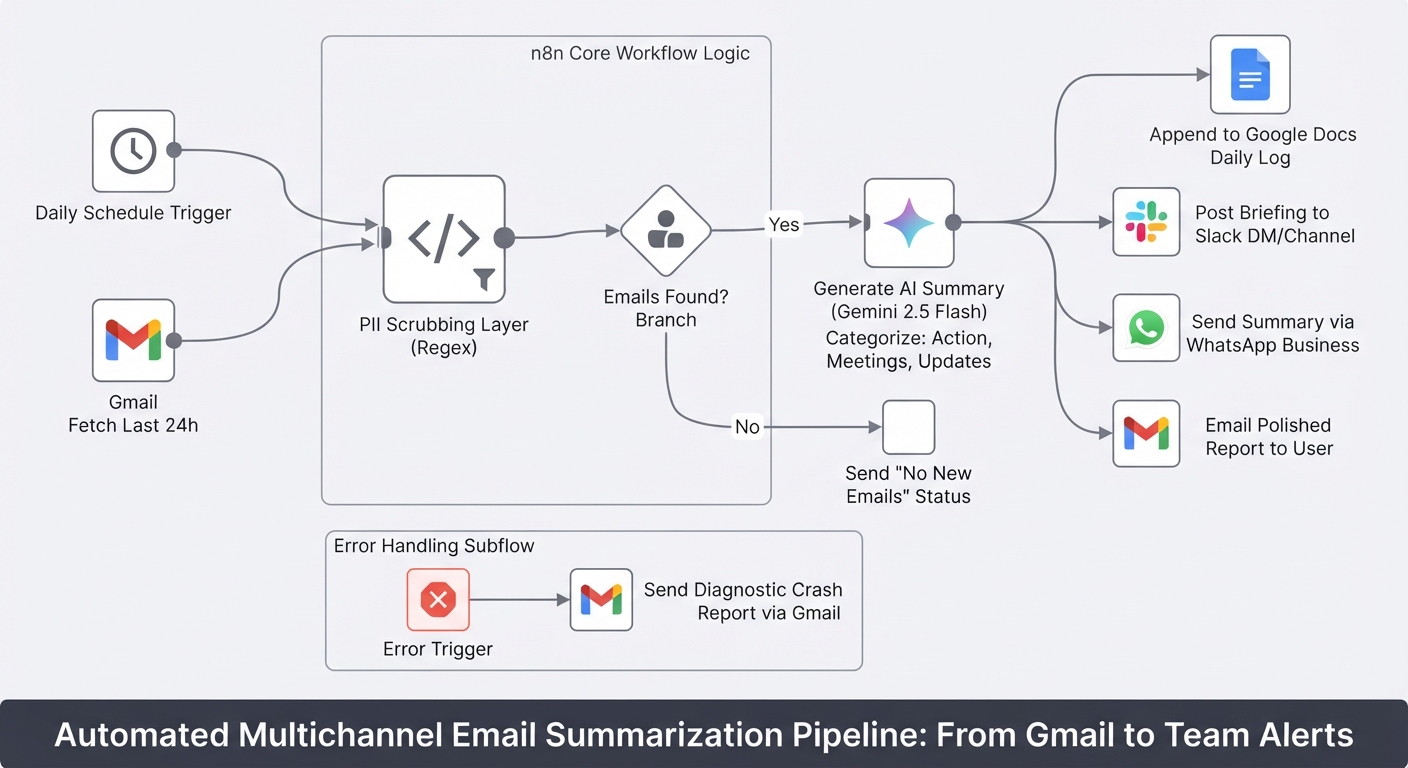
Summarize daily Gmail emails with Gemini and send to Slack, WhatsApp and Docs
Stop starting your day by drowning in unread emails. This workflow turns your Gmail inbox into a prioritized briefing delivered to Slack, WhatsApp, and Google Docs.
Download the n8n Workflow
Import the complete daily Gmail summarization workflow with Gemini AI, Slack, WhatsApp, and Google Docs integration.
Why Manual Email Management Doesn't Scale
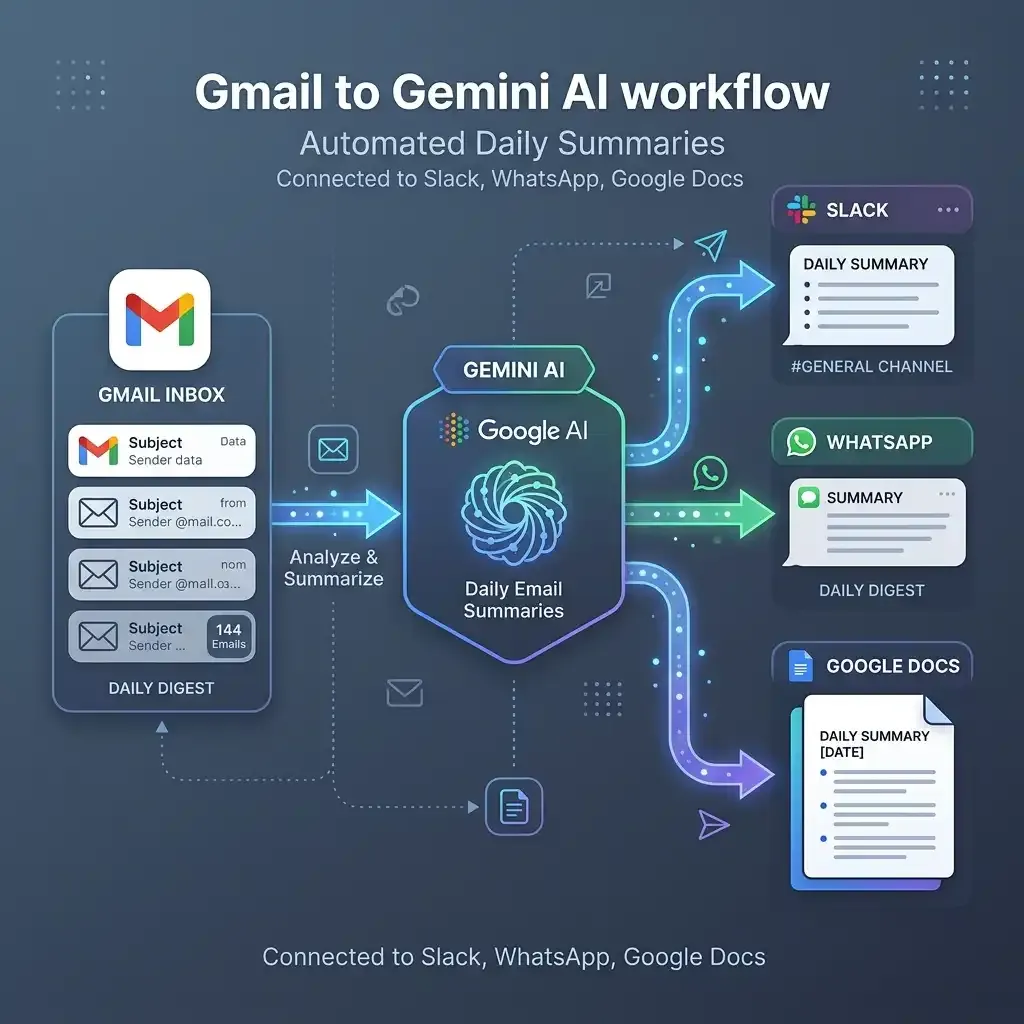
Starting your day by drowning in unread emails is incredibly inefficient when email volume scales. Constantly checking your inbox to ensure you haven't missed urgent action items, meeting requests, or important client updates is one of the most stressful parts of running a business. Missing a revenue-impacting email quickly becomes a massive loss.
Common email management challenges include:
- Wasting the first hour of your day just sorting through inbox noise
- No immediate visibility into which emails actually require your attention
- Important meeting details getting buried under newsletters
- Sending sensitive data to AI models without scrubbing it first
- No automated daily briefings or centralized logs of your communications
Instead of hoping you didn't miss anything important, you can automate your entire inbox summarization pipeline with n8n.
How This Workflow Solves the Problem
This workflow automatically reads your last 24 hours of Gmail on a custom schedule, scrubs sensitive data (like OTPs, passwords, and API keys), and uses Google Gemini 2.5 Flash to group everything into Action Required, Meetings & Events, and Important Updates. It then sends this polished daily briefing directly to your Google Docs, Gmail, Slack, or WhatsApp. It even handles zero-email days gracefully and sends diagnostic alerts if anything fails.
How the Automated Workflow Works
Step 1 — Custom Schedule Trigger
The workflow automatically runs on a schedule you choose (e.g. every morning at 8:00 AM) to prepare your briefing before you start your day.
Step 2 — Fetch & Clean
Pulls primary emails from the last 24 hours via Gmail. A built-in regex privacy layer safely scrubs sensitive patterns (OTPs, passwords, API keys, card numbers) inside n8n before anything reaches the AI model.
Step 3 — Logic Branch (Emails Found or Not)
If your inbox is empty, the workflow skips the AI step entirely and sends a clean "no emails" status to save API calls. If emails are found, it proceeds to summarization.
Step 4 — Generate AI Summary
Google Gemini 2.5 Flash analyzes your emails and generates a formatted text summary, perfectly categorized by priority (Action Required, Meetings, Updates).
Step 5 — Route to Google Docs
Appends your daily summary to a Google Doc, creating a searchable, centralized, and permanent daily email log.
Step 6 — Alert Team via Slack
A structured, easy-to-read daily briefing is posted to your Slack DM or channel so you know exactly where to focus.
Step 7 — Alert via WhatsApp & Gmail
The summary is also routed to your WhatsApp number and sent as a formatted email report, ensuring delivery wherever you already live.
Step 8 — Smart Error Handling
If any step fails (e.g., expired credentials or an API error), a global error handler catches the failure and emails you a diagnostic crash report automatically so nothing breaks silently.
Need Help Implementing This Workflow?
Our automation experts can customize this Gmail summarization workflow specifically for your inbox and daily operations.
We can help with:
- ✅ n8n Workflow Development
- ✅ Gmail and Google Docs Integration
- ✅ Slack and WhatsApp API Integration
- ✅ Advanced AI Prompt Engineering (Gemini)
- ✅ Custom PII Scrubbing Rules
- ✅ Multi-inbox Management
- ✅ Ongoing Workflow Support
Explore Our n8n Automation Services →
Step-by-Step Setup Guide
Step 1 — Connect Gmail & Google Docs
Connect your Google OAuth2 credentials (gmail.readonly, gmail.send, documents). Note: n8n will use a single connection for both fetching and sending emails.
Step 2 — Connect Gemini AI
Add your Google Gemini API key to enable AI summarization (defaults to gemini-2.5-flash).
Step 3 — Connect Slack & WhatsApp
Connect your Slack credentials (chat:write) and WhatsApp Business Cloud API to enable multichannel delivery.
Step 4 — Update Configuration Node
Open the "Set Configuration" node and fill in your target email, Slack user ID, and WhatsApp number. Set the receiveOverviewIn... fields to true for your preferred platforms.
Step 5 — Activate Workflow
Click "Test Workflow" to see a dummy email get scrubbed and summarized, then toggle the workflow to Active to run every morning.
System Requirements & Features
Workflow Features
- Prioritized daily briefing (Action Required, Meetings, Updates)
- Deliver anywhere (Docs, Gmail, Slack, WhatsApp)
- Safe to use with AI (PII scrubbing)
- Zero wasted API calls (handles empty inboxes)
- Built-in error alerts
Requirements
| Tool | Requirements |
|---|---|
| Gmail & Docs | OAuth2 Credentials (readonly, send, write) |
| Gemini AI | Google Gemini API Key |
| Slack | OAuth2 Credentials (chat:write) |
| WhatsApp Business Cloud API access | |
| n8n | Version 1.0+ |
Customization Options
- Change Email Scope: Edit the labels in the Gmail fetch node to include Promotions, Updates, or a specific sender.
- Filter by Project: Enable filterBySubject or filterBySender in the config node to build a summary focused on one client or topic.
- Adjust the Tone: Edit the prompt in the Build LLM Prompt node to make summaries more detailed, concise, or in a different language.
- Change the Schedule: Update the Schedule Trigger to run twice a day, weekly, or on any cadence you need.
Real-World Use Cases
- Founders & Executives: Start every morning with a 60-second read of everything that matters in your inbox.
- Project Managers: Keep a searchable daily email log in Google Docs without lifting a finger.
- Sales Teams: Stay on top of client communications even when you're away from your inbox.
- Privacy-Conscious Teams: Safely use AI for email management without exposing passwords or OTPs to external model providers.
Best Practices
- Set a backup admin email in the Error Alert node to ensure you always get crash reports.
- Review your PII scrubbing regex periodically if you have custom sensitive data formats.
- If gemini-2.5-flash is unavailable in your region, simply switch the AI node model to gemini-1.5-flash.
- Ensure the workflow is set to Active so schedule triggers execute every morning.
Conclusion
Reviewing a cluttered inbox every morning is stressful and inefficient. This n8n workflow automates your email management, scrubs sensitive data, and delivers a perfectly prioritized daily briefing exactly where you want it, ensuring you never miss a critical message again.
Ready to automate your inbox? 👉 Download the Free n8n Workflow Template Today
Related Posts
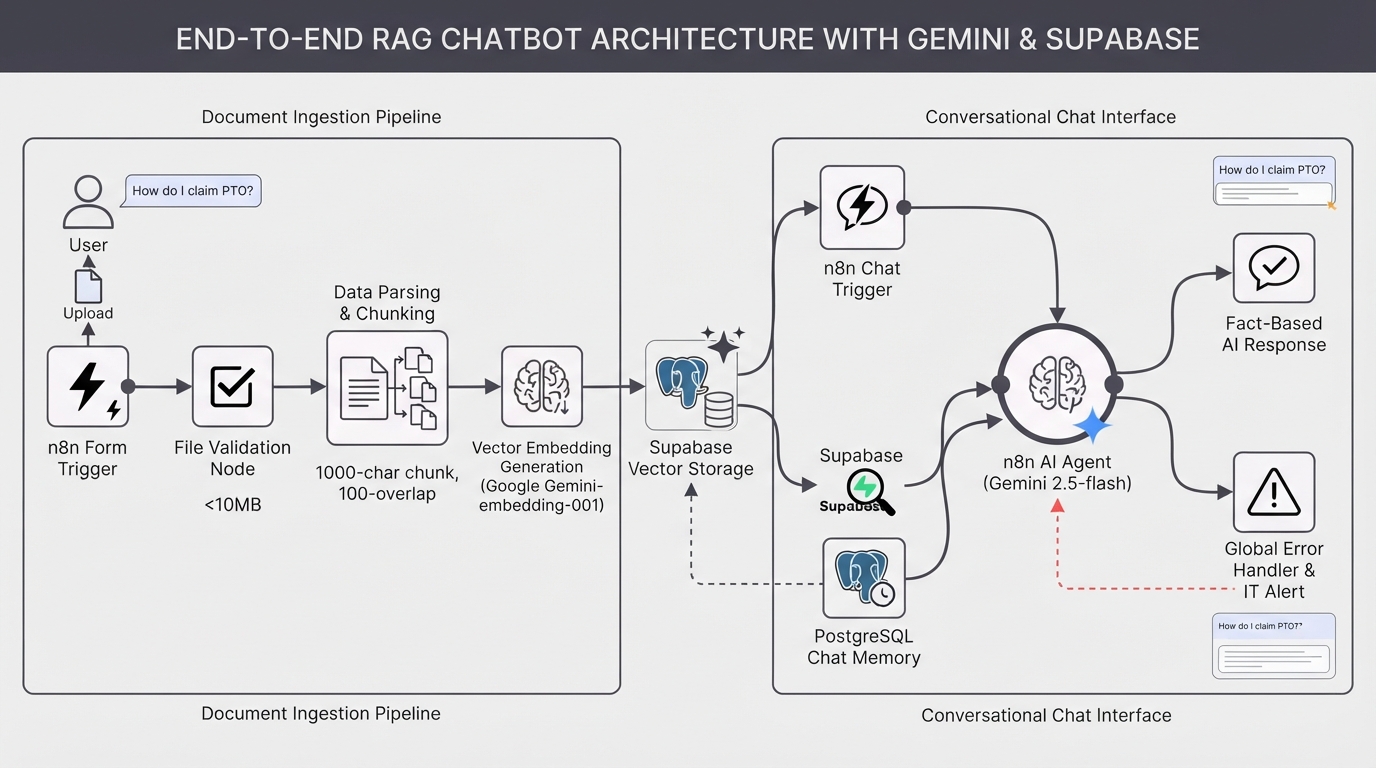
Build a RAG chatbot using Google Gemini and a Supabase vector store
Build a custom AI knowledge base in minutes. This complete RAG system uses Google Gemini and Supabase to ingest documents and provide accurate, context-aware chatbot answers.
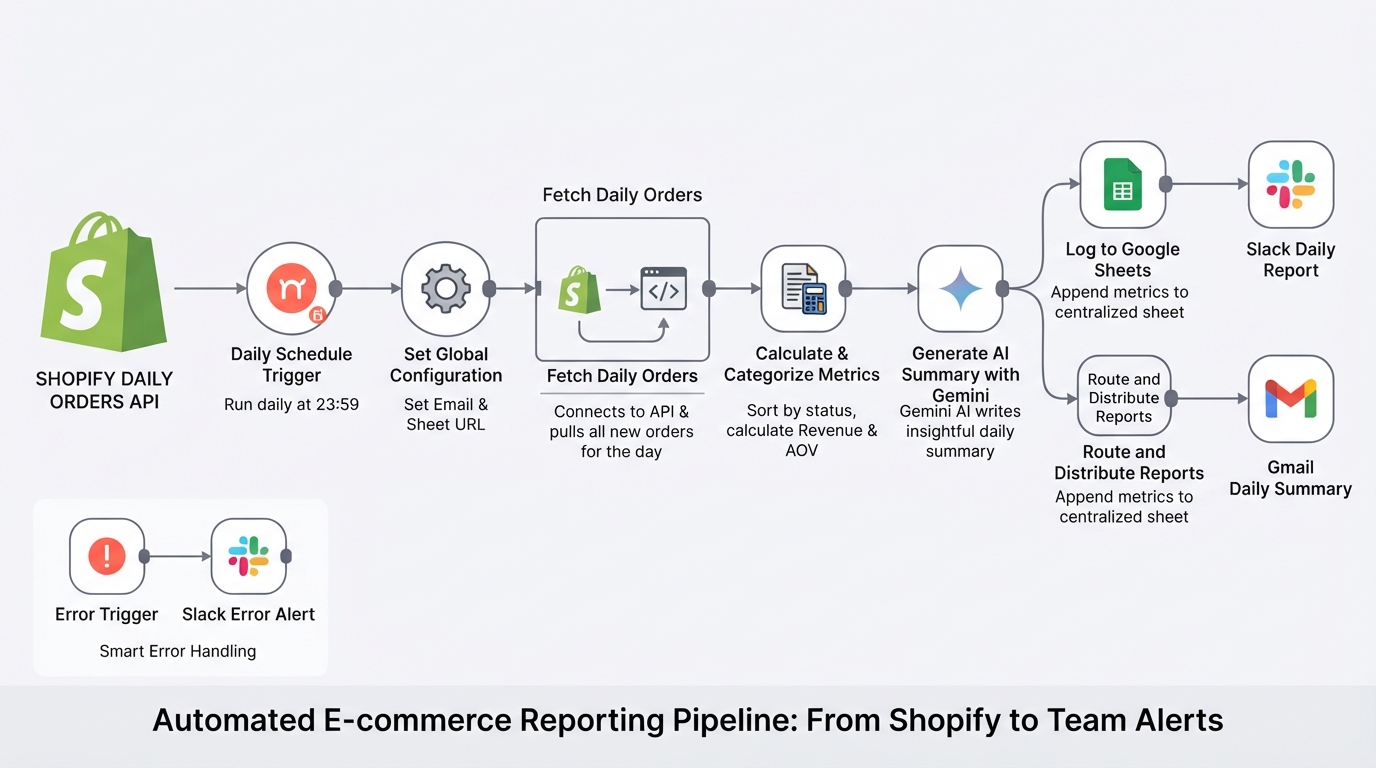
Summarize daily Shopify orders with Gemini, Google Sheets, Gmail and Slack
E-commerce store management made easy. The workflow pulls your daily Shopify orders, calculates metrics, logs them to Google Sheets, and uses Gemini AI to send a polished summary to your team via Slack and email.

Send Payment Reminders and Cancel Unpaid Shopify Orders via Gmail
Automate unpaid Shopify order recovery. Send staged payment reminders via Gmail, automatically cancel expired orders, restock inventory, and receive daily CSV admin audit reports with n8n.
Monitor Shopify orders and send no-order alerts via Slack and email
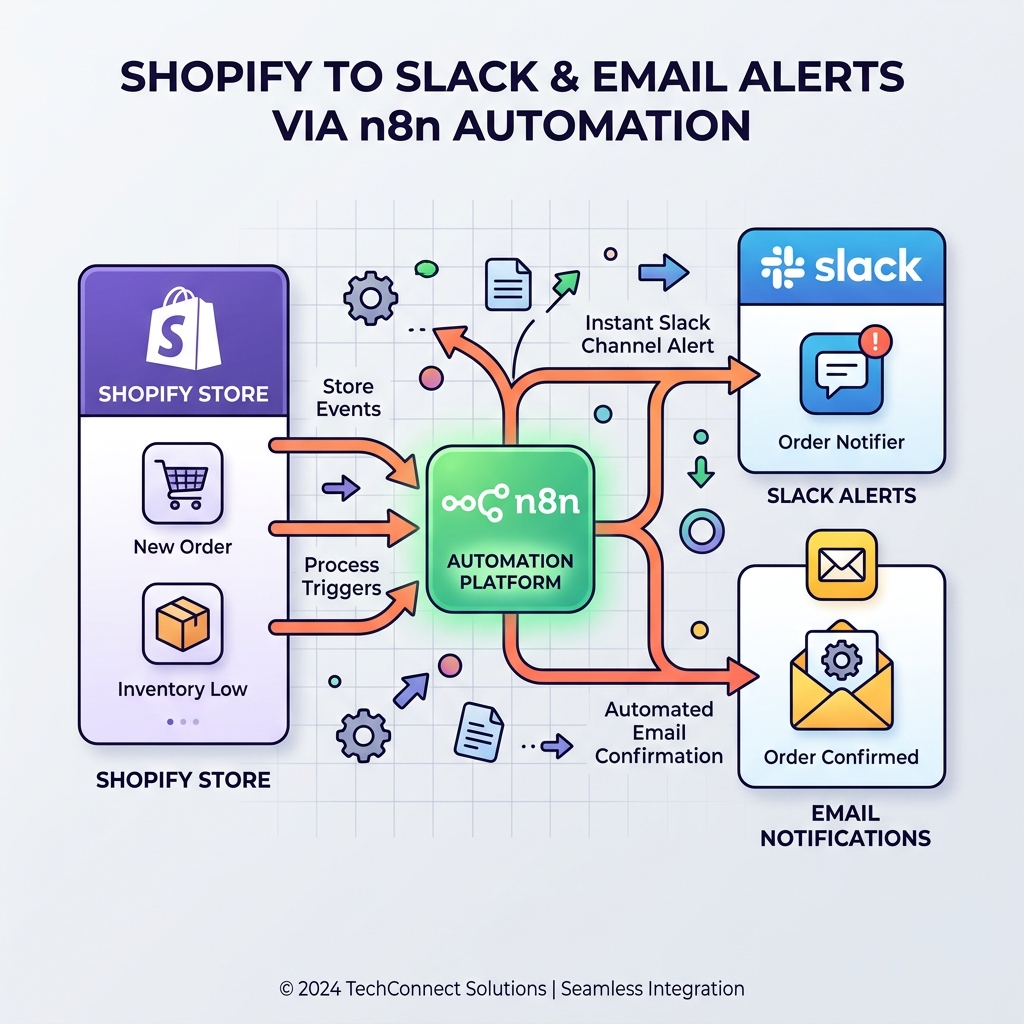
Never miss a revenue-impacting failure. This n8n workflow monitors your Shopify store and triggers an alert if X minutes pass without a single new order.