

Shopify Dead Inventory Detection: Automated Workflow to Recover Lost Revenue
Detect unsold Shopify inventory automatically. Monitor dead stock, send CSV reports via Gmail and Slack alerts. Free n8n workflow template included.
Download the n8n Workflow
Import the workflow used in this guide.
Why Dead Inventory Matters for Shopify Stores

The Hidden Cost of Stagnant Stock
Every Shopify store merchant faces the same challenge: products that aren't selling. Whether due to seasonal shifts, supply chain miscalculations, or changing customer preferences, dead inventory accumulates silently.
Key statistics:
- Retailers waste $1.75 trillion annually on excess inventory
- Dead stock ties up 15-25% of typical retail working capital
- Manual inventory audits cost $5,000-$15,000 per year for mid-sized stores
Common Causes of Dead Shopify Inventory
- Overstocking seasonal items – Summer gear lingering into winter
- Product variants that underperform – Sizes or colors customers don't want
- Discontinued product remnants – Old inventory from legacy product lines
- Slow-moving SKUs – Products with 6+ months without sales
- Vendor overcommitments – Bulk orders that didn't convert
Real Business Impact
Dead inventory creates:
- Cash flow problems – Capital locked in unsold stock
- Storage costs – Warehouse space for items generating zero revenue
- Markdowns – Steep discounts needed to clear old stock
- Missed opportunities – Budget that could fund better-performing products
How Automated Detection Solves the Problem

Traditional Approach: Manual Audits
- Spreadsheets updated weekly/monthly
- Hours spent cross-referencing orders with inventory
- Delayed detection (problems discovered weeks later)
- Error-prone data entry
- No real-time alerts
Modern Approach: Automated Workflow
- Daily automated scans
- CSV reports delivered directly to teams
- Instant Slack notifications
- Email alerts to stakeholders
- Historical tracking for trend analysis
The Dead Inventory Detection Workflow: How It Works
This workflow is available as a free template on n8n. 👉 View & Download the Workflow Template
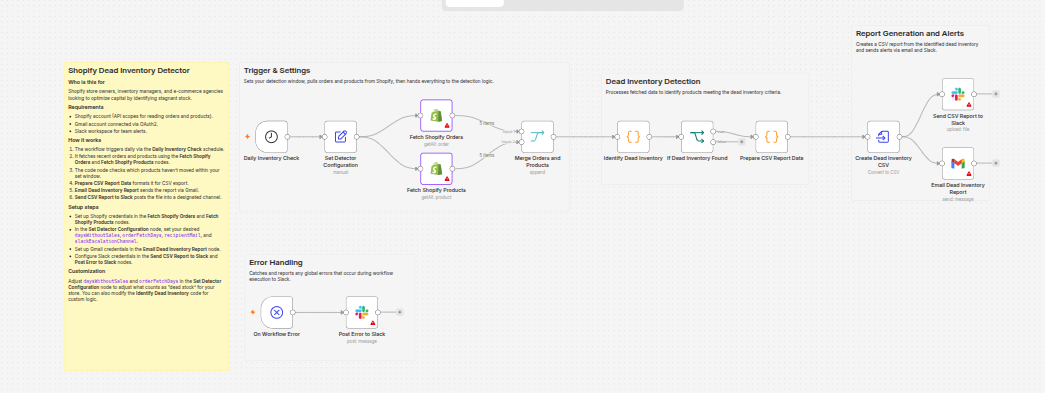
Step-by-Step Process
1. Daily Schedule Trigger (7:00 AM)
The workflow runs automatically every morning, ensuring your team starts each day with fresh data.
2. Fetch Shopify Data
- Pulls all paid orders from a configurable lookback period
- Retrieves complete product catalog with stock levels
- Compares real-time inventory against sales history
3. Identify Dead Inventory
Products are flagged as "dead" when:
- No sales in the last X days (configurable, typically 30-90 days)
- Current stock > 0 (item still in inventory)
- Not recently purchased by any customer
The algorithm sorts by total inventory value, so your highest-value dead stock appears first.
4. Generate CSV Report
Dead inventory data is formatted into a professional CSV with:
- Product name & SKU
- Variant details (size, color, etc.)
- Current stock level
- Days since last sale
- Total inventory value
- Suggested action
5. Deliver via Gmail & Slack

- Gmail: Full CSV report sent to configured recipient's inbox
- Slack: Same file uploaded to designated channel for team visibility
- Error Handling: Any workflow failures post to Slack with error details
Setup Requirements & Configuration
Prerequisites
Shopify Requirements:
- Shopify Admin API access
- Read Orders permission
- Read Products permission
- (Standard for most Shopify apps)
Gmail Setup:
- Gmail account with OAuth2 authentication
- Permission to send emails via Gmail API
- (Security best practice: use a dedicated business email)
Slack Setup:
- Slack workspace access
- Channel ID for report uploads
- Channel ID for error notifications
- (Recommended: separate channels for reports and alerts)
Real-World Use Cases
Use Case 1: Seasonal Clearance Planning
Scenario: Fashion retailer with seasonal inventory rotation
- Workflow detects last season's items with zero sales after 60 days
- Marketing team uses report to plan end-of-season clearance
- Result: 40% of dead inventory cleared within 2 weeks
Use Case 2: Vendor Performance Analysis
Scenario: Multi-vendor marketplace
- Identifies which vendor shipments contain slow-moving SKUs
- Informs vendor negotiations and reorder decisions
- Result: 35% reduction in vendor overstock incidents
Use Case 3: Warehouse Optimization
Scenario: Growth-stage e-commerce with limited storage
- Dead inventory report triggers warehouse audits
- Prevents storage space waste on non-selling items
- Result: 20% reduction in monthly storage costs
Use Case 4: Cash Flow Recovery
Scenario: Merchant facing cash flow pressure
- Quickly identifies high-value dead stock ($500+ items)
- Prioritizes liquidation of expensive inventory
- Result: $25K+ recovered through targeted clearance sales
Step-by-Step Implementation Guide
Step 1: Connect Shopify OAuth2
📖 Shopify Admin API Authentication Docs
- In n8n, add a Shopify node
- Click "Create New Credential"
- Authorize with your Shopify Admin account
- Grant "read_orders" and "read_products" scopes
- Name credential: "Shopify Store – [Your Store Name]"
Step 2: Connect Gmail
- Add a Gmail node
- Click "Create New Credential"
- Authorize with Gmail OAuth2
- Grant email sending permissions
- Name credential: "Gmail – Inventory Alerts"
Step 3: Configure Slack
📖 Slack API Authentication & Permissions Docs
- Create a new Slack channel:
#inventory-reports - Get the Channel ID (right-click channel → Copy ID)
- In n8n, add Slack node credential
- Paste Channel ID in workflow settings
Best Practices for Maximum Impact
1. Set Aggressive But Fair Thresholds
- Start with 90 days for general retail
- Adjust to 30-60 days for fast-moving fashion
- Use 180+ days for luxury/seasonal goods
- Monitor and refine based on category
2. Act Within 48 Hours
Dead inventory reports are only valuable if actioned quickly:
- Flag for discount markup same day
- Launch clearance campaign within 48 hours
- Update purchase forecasting immediately
3. Track Trends Over Time
- Keep historical CSV reports
- Monitor month-over-month dead inventory growth
- Identify patterns in underperforming products
- Adjust sourcing strategy based on data
Troubleshooting Common Issues
Issue: No Dead Inventory Detected
Causes:
- Threshold too high (increase days number)
- Workflow not pulling orders correctly
- Products not properly tracked in Shopify
Solutions:
- Reduce
daysWithoutSalesfrom 90 to 60 - Verify Shopify API credentials are active
- Check product settings (ensure variants are tracked)
Issue: CSV File Not Received in Gmail
Causes:
- Gmail OAuth2 token expired
- Email address typo
- Gmail spam filters blocking
Issue: Slack Channel Not Receiving Files
Causes:
- Incorrect channel ID
- Slack bot permissions insufficient
- Channel doesn't exist or is private
Comparison: Manual vs. Automated
| Factor | Manual Audits | Automated Workflow |
|---|---|---|
| Frequency | Weekly/Monthly | Daily |
| Time Investment | 8-16 hours/week | 15 min setup + 5 min review |
| Accuracy | 85-90% (human error) | 99%+ |
| Cost | $2,000-$5,000/month salary | Free (n8n) or $20-50/month |
| Actionability | 5-7 day delay | Same day |
| Scalability | Breaks at 5K+ SKUs | Handles 100K+ SKUs |
Related Posts
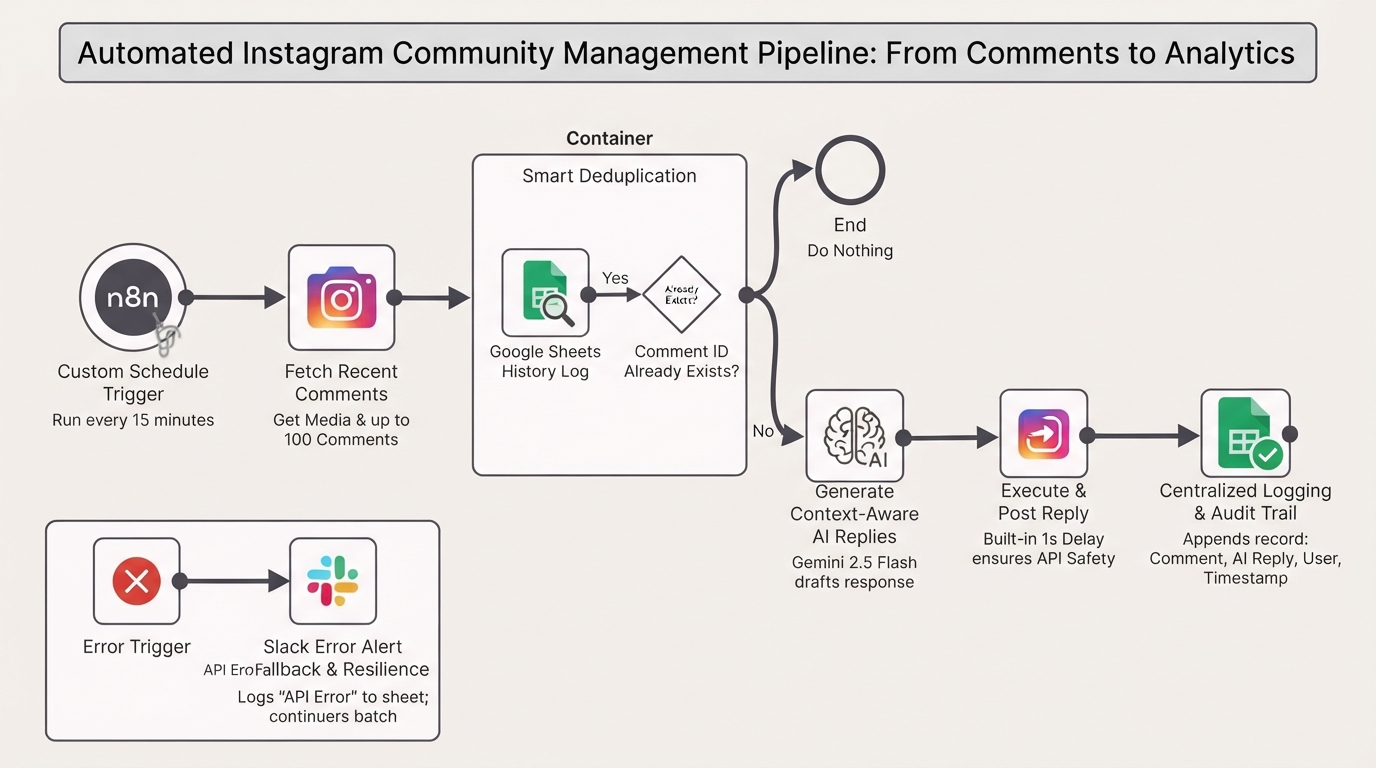
Auto-reply to Instagram comments with Gemini and Google Sheets tracking
Automate your Instagram community management authentically. This n8n workflow monitors your posts, uses Gemini AI to generate context-aware replies, and logs interactions in Google Sheets.
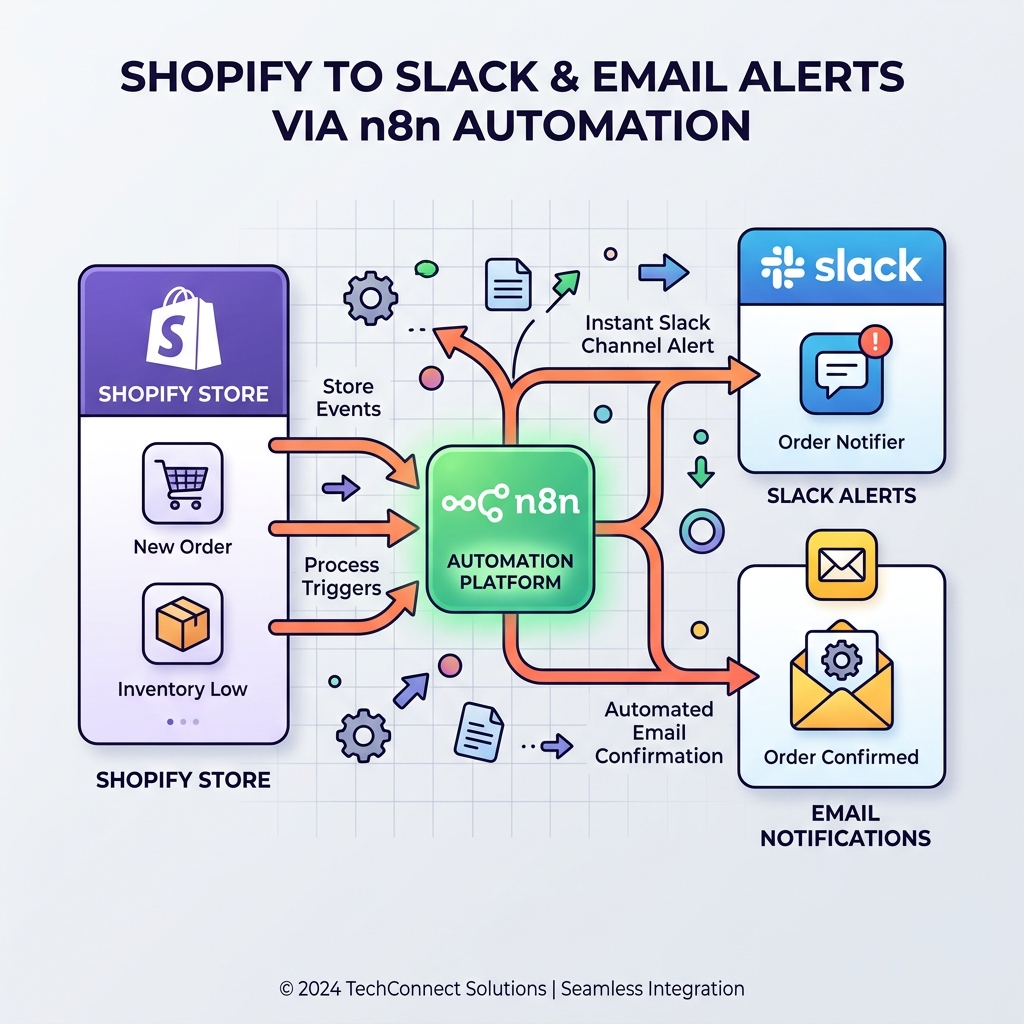
Monitor Shopify orders and send no-order alerts via Slack and email
Never miss a revenue-impacting failure. This n8n workflow monitors your Shopify store and triggers an alert if X minutes pass without a single new order.
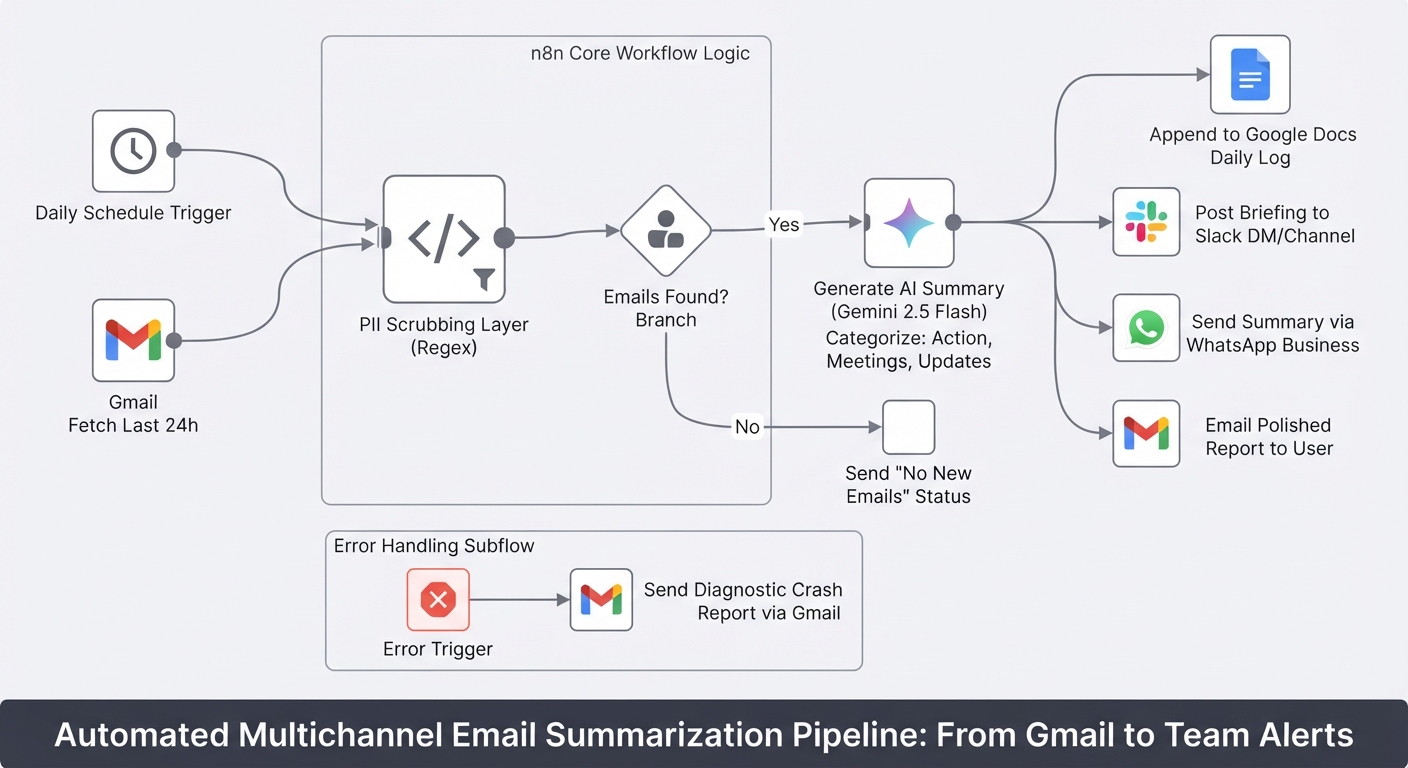
Summarize daily Gmail emails with Gemini and send to Slack, WhatsApp and Docs
Stop starting your day by drowning in unread emails. This workflow turns your Gmail inbox into a prioritized briefing delivered to Slack, WhatsApp, and Google Docs.
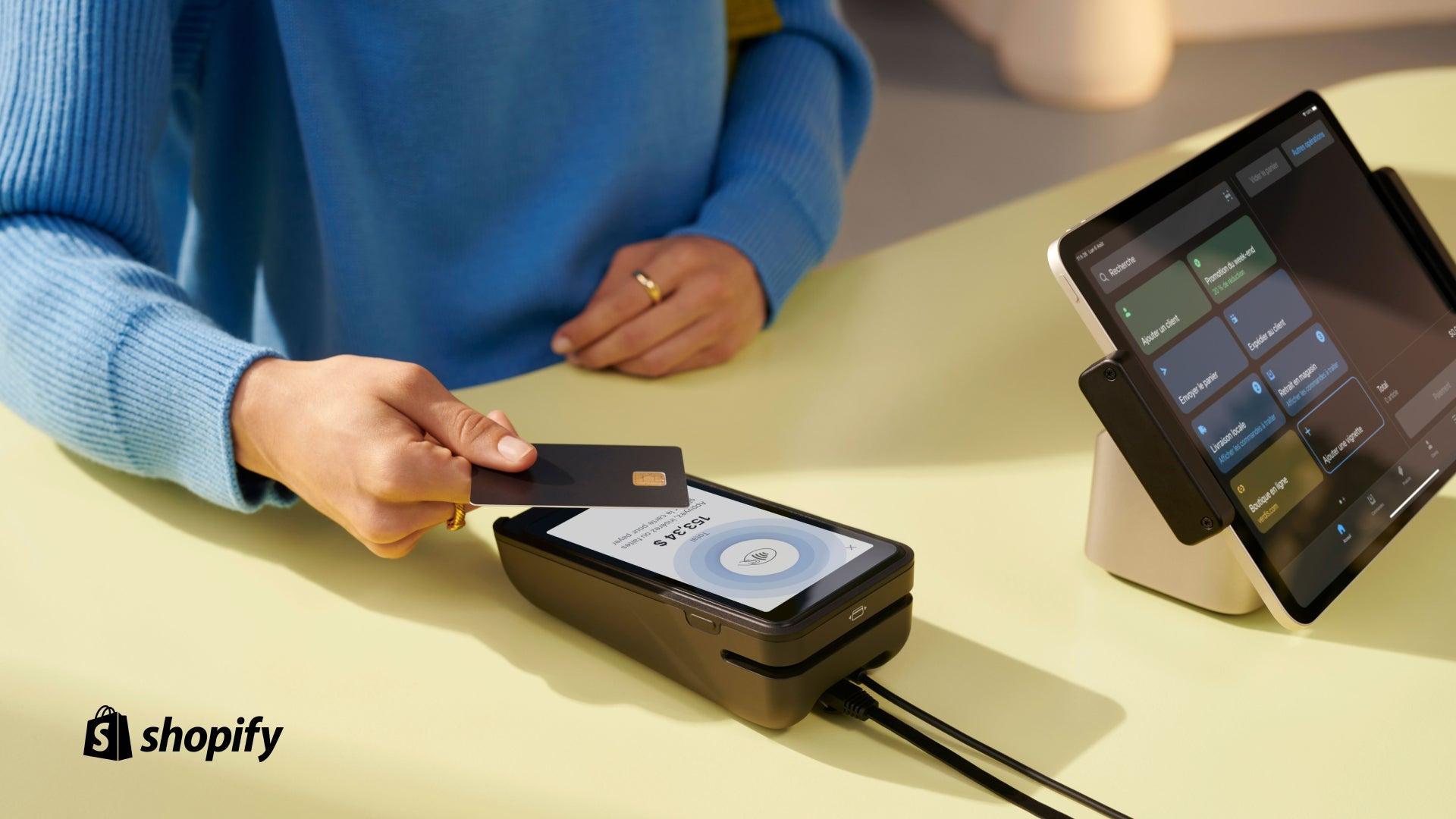
An Ultimate Guide to Shopify POS
Selling in person is one of the most powerful ways to build real customer relationships. Shopify POS (Point of Sale) bridges the gap between your online store and physical retail, allowing you to manage everything—from inventory to payments—in one unified system.