
Generate monthly AI SEO content with Gemini for WordPress, LinkedIn and socials
An end-to-end AI content engine. Automate your strategy, generate 34 SEO assets and images with Gemini, and schedule them to WordPress, LinkedIn, Facebook, and Instagram natively using n8n.
Download the n8n Workflow
Import the complete Monthly AI SEO Content Engine workflow to automate your content marketing across WordPress, LinkedIn, Facebook, and Instagram.
Why Manual SEO Content Creation Doesn't Scale

Creating a cohesive, monthly content marketing strategy requires a massive investment of time and resources. From analyzing Google Analytics to drafting SEO blogs, writing accompanying social media posts, generating graphics, and manually scheduling across multiple platforms—the process is a logistical nightmare for marketing teams and solo founders alike.
Common content marketing challenges include:
- Spending days manually researching topics and identifying SEO content gaps
- Struggling to maintain a consistent brand voice across blogs, LinkedIn, and social platforms
- The high cost of hiring dedicated writers, graphic designers, and social media managers
- Wasting time manually uploading and scheduling posts in WordPress, Facebook, and Instagram
- Generating content that isn't backed by actual performance data or Google Trends
Instead of struggling to feed the content machine manually, you can completely automate your brand's end-to-end content lifecycle with n8n and Gemini AI.
How This Workflow Solves the Problem
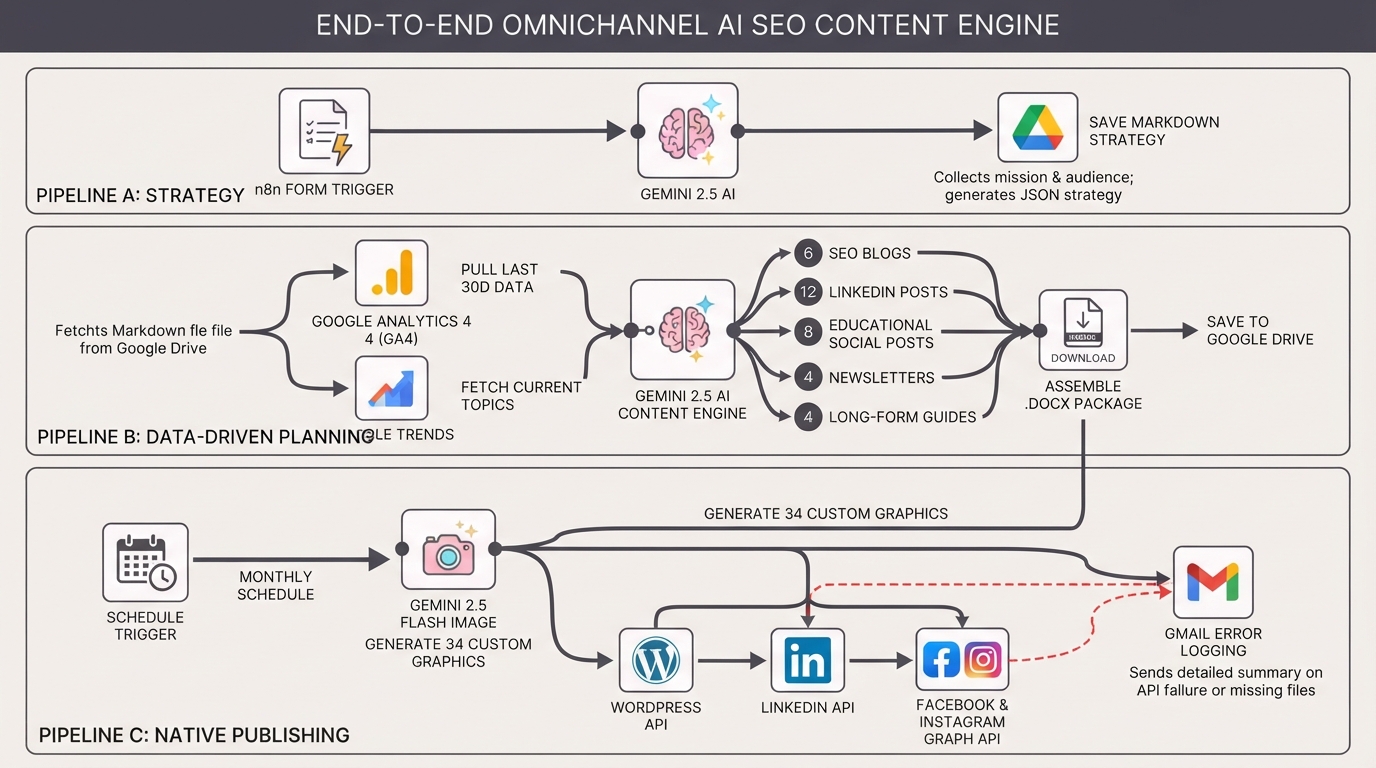
This enterprise-grade n8n workflow acts as an automated content marketing department. It captures your business context to generate a master strategy document, uses real-time Google Analytics 4 (GA4) and Google Trends data to inform the plan, and leverages Gemini 2.5 AI to write and generate custom images for 34 distinct assets per run. It then automatically schedules these SEO blogs, LinkedIn posts, and social updates directly to WordPress, Facebook, and Instagram.
How the Automated Workflow Works
Step 1 — Strategy Generation (Pipeline A)
An n8n Form Trigger collects your company's mission, audience, and core services. Gemini generates a strict JSON strategy object, which is formatted into a comprehensive Markdown document and saved to Google Drive.
Step 2 — Data-Driven Content Planning (Pipeline B)
The workflow fetches your Markdown strategy, pulls the last 30 days of GA4 data to identify high-bounce pages, and fetches current Google Trends to inform the content plan intelligently.
Step 3 — High-Volume AI Generation
Google Gemini is prompted in stages to write 34 targeted assets: 6 SEO blogs, 12 LinkedIn posts, 8 educational social posts, 4 newsletters, and 4 long-form guides.
Step 4 — Native Document Assembly
The workflow bypasses basic text outputs by dynamically assembling the generated content into a professionally styled, downloadable Microsoft Word (.docx) package with a generated table of contents, saving it to Google Drive.
Step 5 — Multi-Platform Publishing (Pipeline C)
On a scheduled basis (e.g., the 1st of the month), the workflow extracts the raw text from the .docx package and automatically parses it for publication.
Step 6 — AI Image Generation
Uses Google Gemini 2.5 Flash Image to generate custom, photorealistic featured images and social media graphics natively for every single post.
Step 7 — Omnichannel Scheduling
Uploads blog images to WordPress Media and creates future-dated WordPress posts. It simultaneously publishes text and images natively to LinkedIn, Facebook Pages, and Instagram Business.
Step 8 — Automated Error Logging & Alerts
Built-in error trapping sends a detailed summary to your Gmail if any API fails, or if prerequisite files are missing before the publishing phase begins.
Need Help Implementing This Workflow?
Our automation experts can customize this AI Content Engine workflow specifically for your agency or brand, ensuring the output perfectly matches your brand voice and SEO strategy.
We can help with:
- ✅ n8n Workflow Development & Pipeline Integration
- ✅ Advanced Gemini AI Prompt Engineering (Text & Image)
- ✅ Google Analytics 4 (GA4) & Google Trends Integrations
- ✅ WordPress API & Custom Post Type Configuration
- ✅ Multi-platform Social Media API Setup (LinkedIn, Meta)
- ✅ Dynamic Document Generation Automation
- ✅ Ongoing Workflow Support & Optimization
Explore Our n8n Automation Services →
Step-by-Step Setup Guide
Step 1 — Credentials Setup
You will need active credentials for Google Drive, Google Analytics (OAuth2), Gmail, LinkedIn (requires openid scope), Facebook Graph API, AWS S3, and a Google Gemini API key.
Step 2 — Run Pipeline A (Strategy)
Run the n8n Form Trigger manually, fill out your company details, and let it generate your initial Markdown strategy file in the root of your Google Drive.
Step 3 — Configure Pipeline B (Generation)
Open the "Config: Pipeline B" node. Enter your GA4 Property ID, notification email address, the direct Drive link to the generated Markdown file, and your preferred Google Trends geographic codes.
Step 4 — Configure Pipeline C (Publishing)
Open the "Config: Pipeline C" node. Enter your WordPress domain, Facebook Page ID, Instagram Business ID, your S3 bucket details (used to temporarily host images for Instagram), and a notification email.
Step 5 — Activate Workflows
Ensure your WordPress site has Application Passwords enabled for Basic Auth. Turn the workflow on, and Pipelines B and C will execute automatically on their schedules.
System Requirements & Features
Workflow Features
- Automated Brand Strategy via n8n Form Trigger
- GA4 & Google Trends Data Integration
- High-Volume Asset Generation (34 items per run)
- Native .docx Generation & Formatting
- Gemini AI Custom Image Generation
- Omnichannel Scheduling (WP, LinkedIn, FB, IG)
Requirements
| Tool | Requirements |
|---|---|
| Google Workspace | Drive, Gmail, Analytics (GA4) OAuth2 Credentials |
| Gemini AI | Google Gemini API Key (Budget for ~150k output tokens) |
| AWS S3 | Public-read bucket access (for Instagram image fetching) |
| WordPress | Basic Auth enabled (Application Passwords) |
| Social Media APIs | LinkedIn (openid scope), Facebook Page, Instagram Business |
| n8n | Version 1.60+ |
Customization Options
- Adjust Output Volume: Modify the JSON prompt in the "Build Content Plan Prompt" node to generate weekly content (e.g., 2 blogs, 4 social posts) instead of massive monthly batches.
- Change the Tone: Update the "Brand Voice" restrictions in the n8n Form Trigger or tweak the system prompts to match a specific industry style (e.g., highly technical vs. casual).
- Add Human-in-the-Loop: Replace the direct link between Pipeline B and C with a Wait node that pauses publishing until a manager clicks an approval webhook link sent via email.
Real-World Use Cases
- Marketing Agencies: Scale monthly content deliverables for multiple clients while ensuring the AI strictly adheres to completely different brand guidelines effortlessly.
- SEO Consultants: Automate high-volume, keyword-targeted blog clusters that are directly backed by Google Analytics performance and gap data.
- Lean Startups: Maintain a massive, omnichannel social media and blog presence without needing the budget to hire a dedicated content team or social media manager.
- Enterprise Brands: Streamline content approvals by generating styled .docx files that stakeholders can easily review before automated publishing occurs.
Best Practices
- Always review your generated .docx file before the publishing pipeline (Pipeline C) triggers to ensure brand safety and factual accuracy.
- Ensure your AWS S3 bucket policies allow public-read access, as the Instagram Graph API requires a publicly accessible URL to ingest images.
- Keep an eye on your Gemini API billing dashboard, as generating 34 high-quality text and image assets utilizes a significant number of tokens per run.
Conclusion
Executing an omnichannel SEO and content strategy manually is inefficient and expensive. This comprehensive n8n workflow leverages Gemini AI and robust API integrations to handle everything from strategy and data analysis to drafting, image creation, and scheduling—essentially giving you an automated marketing department.
Ready to automate your content engine? 👉 Download the Free n8n Workflow Template Today
Related Posts
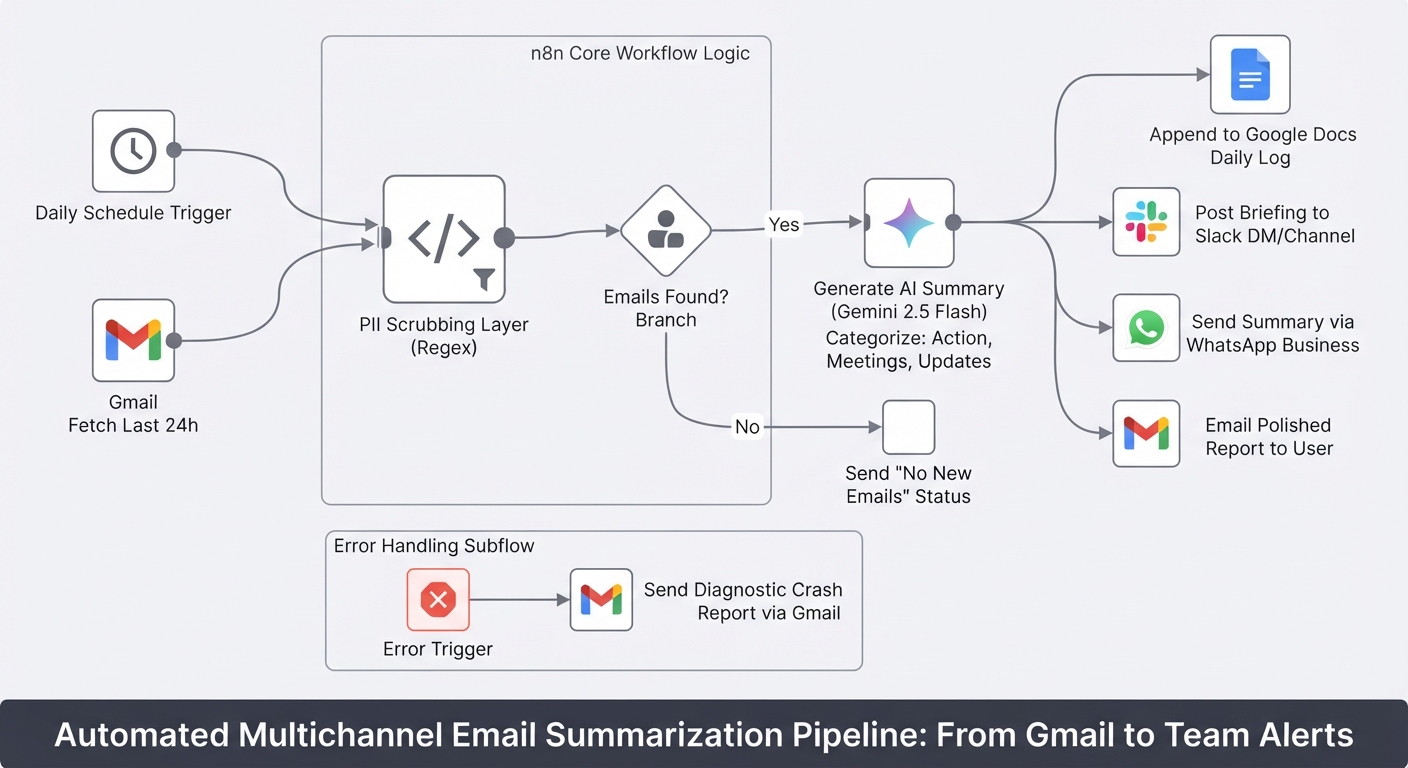
Summarize daily Gmail emails with Gemini and send to Slack, WhatsApp and Docs
Stop starting your day by drowning in unread emails. This workflow turns your Gmail inbox into a prioritized briefing delivered to Slack, WhatsApp, and Google Docs.
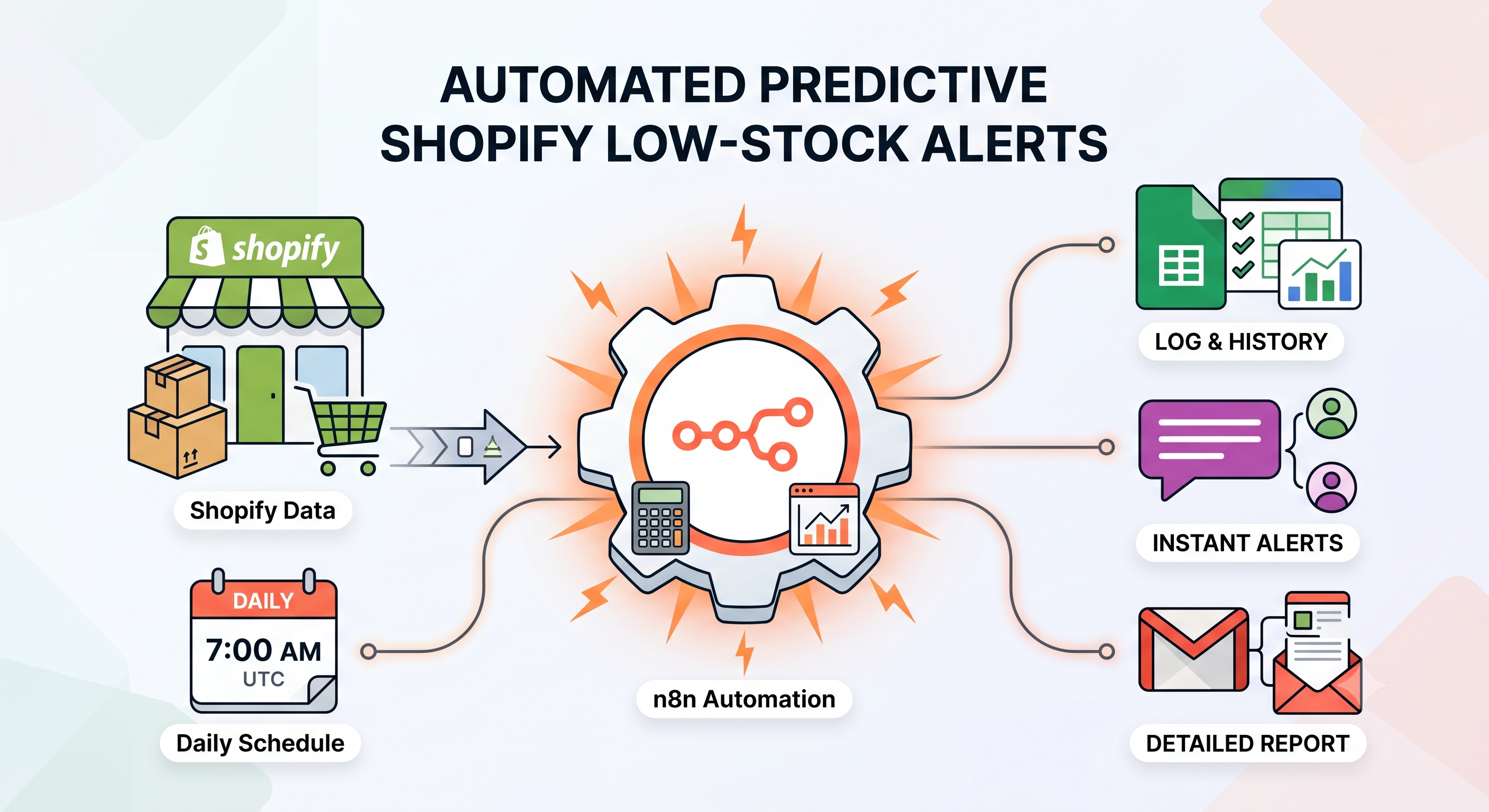
Send Predictive Shopify Low-Stock Alerts with Google Sheets, Slack, and Gmail
Automatically predict Shopify stockouts using sales velocity, send low-stock alerts via Slack and Gmail, and prevent duplicate notifications with Google Sheets using this free n8n workflow.
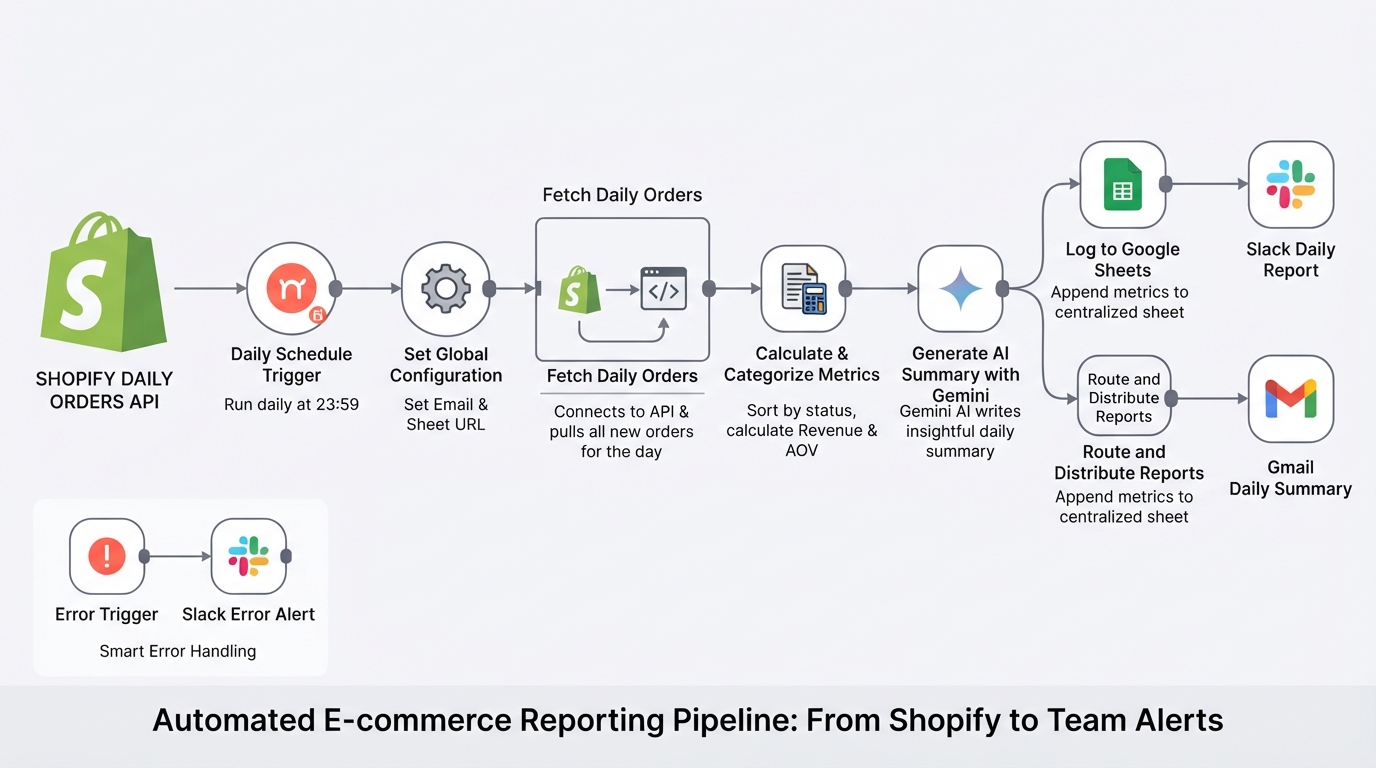
Summarize daily Shopify orders with Gemini, Google Sheets, Gmail and Slack
E-commerce store management made easy. The workflow pulls your daily Shopify orders, calculates metrics, logs them to Google Sheets, and uses Gemini AI to send a polished summary to your team via Slack and email.
Build a RAG chatbot using Google Gemini and a Supabase vector store
Build a custom AI knowledge base in minutes. This complete RAG system uses Google Gemini and Supabase to ingest documents and provide accurate, context-aware chatbot answers.