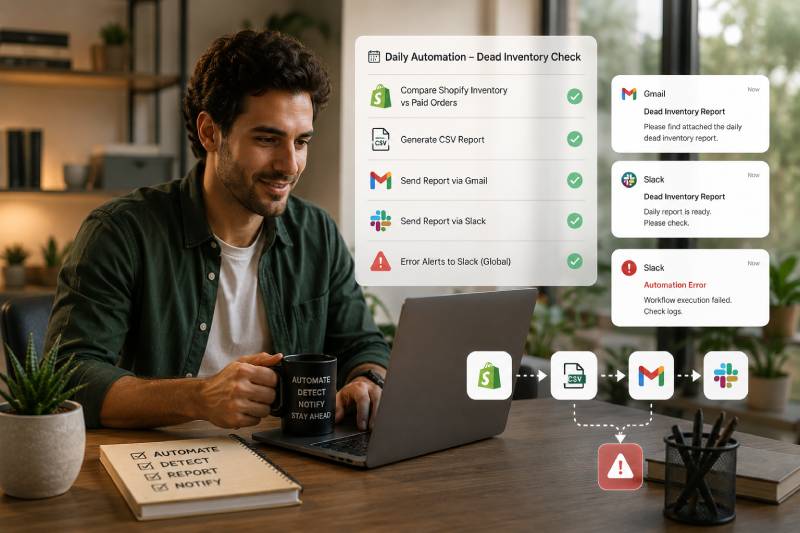
Automation problems we fix every week

Recognize any of these?

Most businesses don't have a people problem. They have a process problem. Your team is doing too much work that software should already be handling.

01

Leads get handled too slowly

New inquiries come in from forms, ads, emails, chat, or marketplaces — but someone still has to copy details, update the CRM, assign owners, and send follow-ups.

02

Your tools don't stay in sync

Customer data changes in one system but not another. Orders, tickets, invoices, contacts, tasks, and reports live in separate places.

03

Reports take too much time

Your team pulls data from multiple tools, cleans spreadsheets, checks numbers, and prepares updates that could be generated automatically.

04

Repetitive tasks create errors

Manual copy-paste work leads to missed fields, duplicate records, wrong statuses, delayed updates, and avoidable follow-up mistakes.

05

Your team waits on approvals

A process gets stuck because someone forgot to notify the right person, attach the right file, or move the task to the next stage.

06

You don't know where to start

You have too many tools, too many manual steps, and no clear idea which workflow should be automated first.

n8n services built around real workflow problems

What we automate with n8n

We don't automate random tasks just because we can. We find workflows that cost time, money, accuracy, and speed — then build automation that actually fits your business.

02
Tool Integration

App-to-App Data Sync

For businesses tired of updating the same customer, order, task, or invoice data across multiple platforms.

  • CRM to spreadsheet sync
  • Ecommerce to accounting workflows
  • Form to database workflows
  • Support ticket to project task creation
  • Error alerts when sync fails
Get Started →
03
Reporting

Automated Reports & Alerts

For teams that need regular business updates without spending hours pulling numbers manually.

  • Daily, weekly, or monthly reports
  • Sales, marketing, support, and ops summaries
  • KPI alerts when numbers change
  • AI-generated report summaries
  • Scheduled email or Slack reports
Get Started →
04
Customer Support

Ticket, Email & Support Automation

For support teams handling repeated requests, manual routing, and slow internal handoffs.

  • Support ticket creation and routing
  • Auto-tagging by topic or urgency
  • FAQ response drafts
  • Escalation alerts
  • Customer follow-up reminders
Get Started →
05
Internal Ops

Approval & Task Automation

For teams where work gets delayed because approvals, reminders, files, or next steps are handled manually.

  • Approval workflows
  • Task creation and assignment
  • Document and file routing
  • Reminder notifications
  • Project management tool updates
Get Started →
06
AI + Automation

AI-Powered n8n Workflows

For businesses that want automation to summarize, classify, draft, decide, and route intelligently.

  • AI email and message summaries
  • AI lead qualification
  • AI ticket classification
  • AI-generated draft replies
  • Human review before sending
Get Started →
Realistic n8n workflow examples

Start with the workflow slowing your team down today.

The best automation project usually starts small: one painful process, one clear outcome, and one workflow your team no longer has to manage manually.

New lead to CRM

Form submitted → lead is checked for duplicates → CRM contact is created or updated → sales owner is assigned → Slack alert is sent → follow-up email is drafted.

Sales teams
1

New form submission received

2

Duplicate lead check runs automatically

3

CRM contact is created or updated

4

Sales owner is assigned and notified

5

Follow-up email draft is prepared

Best for: Sales teams, service businesses, agencies, consultants, B2B companies.
Loading N8NTemplatesSection...
Why we build with n8n

Flexible automation without locking your business into a black box.

n8n gives businesses control over how workflows are built, connected, customized, and extended. It is ideal for teams that need more flexibility than basic automation tools can offer.

01

Connect the tools you already use

Integrate CRMs, spreadsheets, databases, email tools, support platforms, ecommerce systems, project tools, and payment platforms.

02

Build custom logic

Real workflows need conditions, branching, formatting, approvals, retries, and error handling — not just simple triggers.

03

Add AI where it helps

Use AI to summarize, classify, draft, extract, format, and route information inside workflows without turning everything into an experiment.

04

Keep workflows transparent

We document what each workflow does, when it runs, what happens if it fails, and who owns it.

Loading N8NVerifiedCreatorSection...
Why not just use a simple automation tool?

Because growing workflows need more than basic triggers.

Simple tools are useful for simple tasks. But once your business needs conditional logic, error handling, AI steps, custom APIs, or multi-tool workflows, you need a more flexible setup.

What mattersBasic automation toolManual processYourBrand n8n Automation
Multi-step workflowsLimitedSlow and inconsistentBuilt around your full process
Custom business logicBasicDepends on peopleFlexible conditions and routing
Error handlingLimitedUsually discovered lateAlerts, retries, and fallback paths
AI workflow stepsLimited or genericNot availableAdded where it creates value
DocumentationOften missingTribal knowledgeClear workflow documentation
ScalabilityGood for simple tasksBreaks as volume growsDesigned for repeatable operations
Simple process, no automation confusion

What happens after you contact us?

You don't need to map every technical step before reaching out. We help you identify the best workflow to automate, design it clearly, and launch it safely.

1

Audit

We review your tools, repetitive tasks, data handoffs, bottlenecks, and manual processes.

2

Map

We document triggers, data movement, decisions, and where humans stay involved.

3

Build

We create the n8n workflow with integrations, formatting, notifications, and error handling.

4

Test

We run real scenarios, check edge cases, and confirm data accuracy.

5

Launch

We switch on the workflow, monitor first runs, fix issues quickly, and document the system.

6

Improve

We optimize, add steps, connect more tools, and expand automation where it makes sense.

Example automation outcomes

Practical workflows that save time and reduce mistakes.

Replace these sample outcomes with your real client results, screenshots, workflow diagrams, or internal case studies once available.

01

Reclaim hours every week

Teams typically recover 10–20 hours per week on the first workflow we automate — time immediately available for higher-value work.

02

Scale without hiring

Automation handles volume increases without headcount. Double your orders or leads without doubling your ops team.

03

Eliminate manual errors

Humans make mistakes on repetitive tasks. Workflows don't — every run follows the same logic, every time.

Example automation outcomes

Practical workflows that save time and reduce mistakes.

Replace these sample outcomes with your real client results, screenshots, workflow diagrams, or internal case studies once available.

Sales Operations

Lead response stopped depending on manual follow-up

A service business was manually checking form submissions, copying leads into CRM, assigning owners, and sending first replies. We automated the full intake workflow.

8 hrsSaved weekly
3 minLead handoff time
Reporting

Weekly reporting became automatic

A team was pulling numbers from multiple tools every Friday. We built a workflow that collected data, updated the report, generated a summary, and sent it to leadership.

5 hrsSaved per report
1 clickTo trigger summary
Customer Support

Tickets started reaching the right person faster

Support requests were arriving from different channels with no consistent tagging or assignment. We automated ticket creation, classification, routing, and alerts.

35%Fewer repetitive tasks
24/7Ticket routing
Questions before automating with n8n

Before you book a call

Clear answers so you know what to expect before starting an n8n automation project.

n8n is a workflow automation platform that connects apps, moves data, triggers actions, and automates business processes. It can be used for CRM updates, reporting, notifications, support workflows, AI steps, data sync, and more.
No. Most clients know where work feels slow or repetitive, but not how to automate it. We help identify the best first workflow based on time saved, business impact, and implementation complexity.
In most cases, yes. n8n can connect with hundreds of tools through built-in integrations, APIs, webhooks, databases, and custom logic.
A simple workflow can often be launched in 1–2 weeks. More complex workflows with multiple tools, approvals, AI steps, or custom APIs may take 3–6+ weeks.
We can build error handling, alerts, retries, fallback paths, and logs so your team knows when something needs attention. Good automation should never fail silently.
Yes. Not every workflow should be fully automatic. We can build human approval steps for emails, quotes, content, finance actions, sensitive customer responses, or high-value decisions.
Yes. AI can summarize messages, classify tickets, draft replies, clean data, extract information from documents, score leads, or generate report summaries.
Yes. We can monitor workflows, fix issues, improve logic, add integrations, update workflows when tools change, and expand automation as your business grows.
Free automation audit

Let’s find the first workflow worth automating.

Book a free automation audit. We’ll review your tools, identify where your team is losing time, and recommend the most practical n8n workflow to build first.

No technical knowledge neededNo pressureClear workflow recommendationsResponse within 1 business day

Request your automation audit

Tell us what your team is doing manually. We’ll help you decide what can be automated with n8n.

No spam. No hard sell. Just practical advice about what automation can realistically improve.