
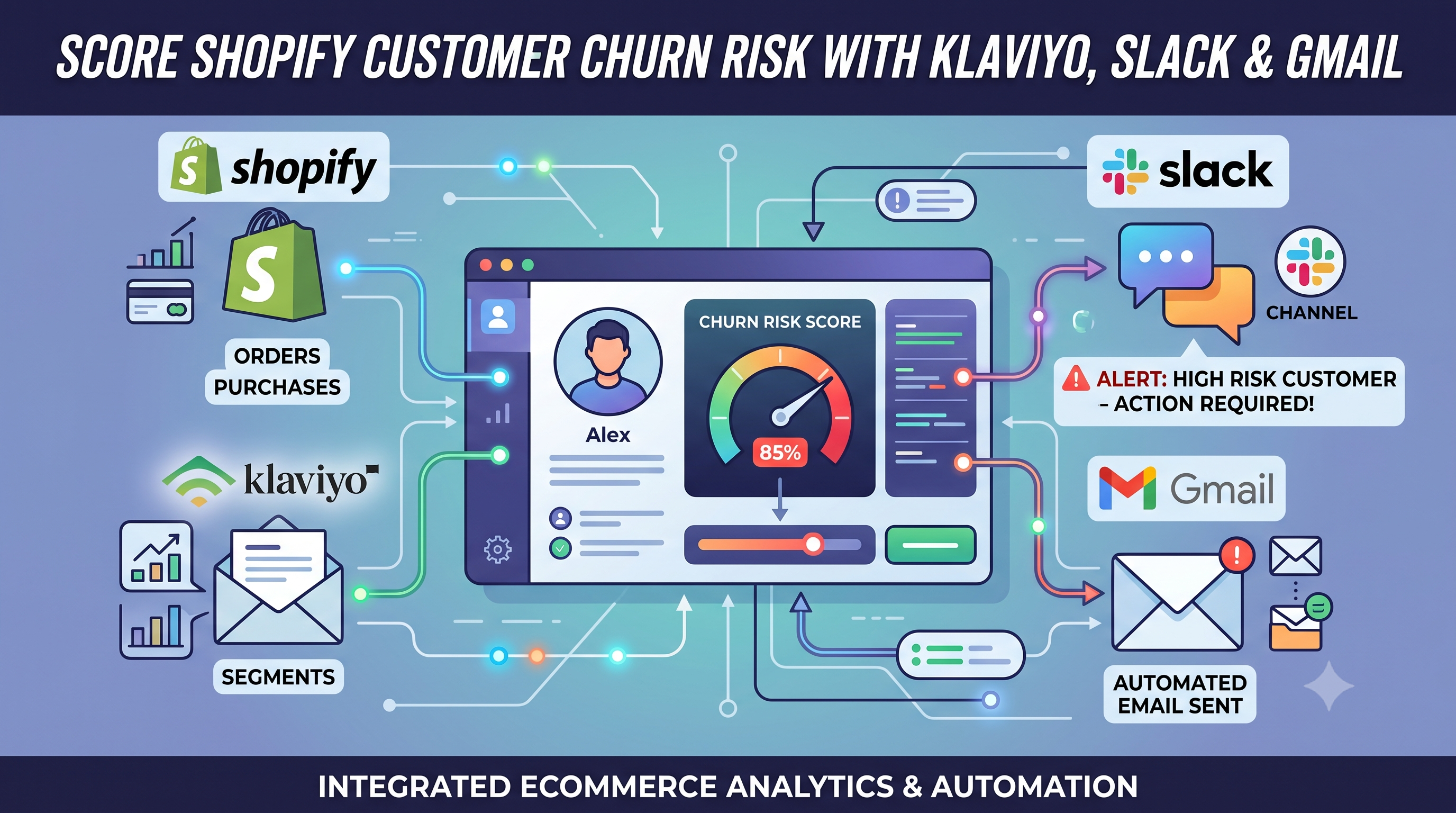
Score Shopify Customer Churn Risk and Sync Results to Klaviyo, Slack, and Gmail
Calculate Shopify customer churn risk dynamically based on reorder intervals. Automatically sync risk scores to Klaviyo and send alerts to Slack and Gmail with this free n8n workflow.
Why Customer Churn Matters for Shopify Stores
Acquiring new customers is expensive, but retaining existing customers is significantly more profitable. Identifying customers who are likely to stop purchasing allows merchants to launch personalized retention campaigns before it's too late.
Businesses that proactively monitor customer churn can improve retention, increase customer lifetime value, and reduce marketing acquisition costs.
What is Customer Churn?
Customer churn refers to shoppers who gradually stop purchasing from your Shopify store. Instead of waiting until customers disappear completely, merchants can predict churn using previous purchase behavior.
- Customers purchasing less frequently
- Long gaps between repeat purchases
- Declining customer lifetime value
- Higher risk of switching to competitors
How This n8n Workflow Works
This automation runs automatically every week and analyzes your Shopify customers to calculate churn risk based on purchasing history.
Step 1 — Weekly Scheduled Trigger
The workflow starts automatically on a weekly schedule and loads your configuration including Shopify domain, thresholds, notification settings, and integrations.
Step 2 — Fetch Shopify Customers
The Shopify Admin GraphQL API retrieves customers in batches of 100 records while filtering customers based on:
- Minimum order count
- Recent purchase activity
- Configured order history window
Step 3 — Calculate Churn Risk
For every customer, the workflow calculates:
- Median days between orders
- Days since last purchase
- Risk ratio
- Risk level (Medium or High)
The algorithm intelligently compares purchasing frequency with recent inactivity to estimate churn probability.
Step 4 — Continue Through Pagination
Large Shopify stores often contain thousands of customers. The workflow automatically continues requesting additional pages until every customer has been analyzed.
Step 5 — Store At-Risk Customers
Customers identified as Medium or High risk are temporarily stored until the workflow finishes processing all pages.
Step 6 — Sync Customer Data to Klaviyo
If enabled, the workflow updates customer profiles inside Klaviyo with:
- Churn Risk
- Days Since Last Order
This allows Klaviyo flows and email campaigns to automatically target customers before they churn.
Step 7 — Generate CSV Report
The workflow generates a CSV report containing:
- Customer Name
- Email Address
- Total Orders
- Median Purchase Interval
- Days Since Last Purchase
- Estimated Revenue At Risk
- Churn Risk Level
Step 8 — Send Slack & Gmail Reports
The CSV report and summary statistics are automatically delivered through Slack and Gmail.
- Weekly summary
- Total customers analyzed
- Medium-risk customers
- High-risk customers
- Revenue at risk
- CSV attachment
Workflow Features
- Automatic weekly execution
- Shopify GraphQL API integration
- Customer churn prediction
- Klaviyo profile synchronization
- Slack notifications
- Gmail reporting
- CSV export
- Error notifications
- Pagination support
- Fully configurable thresholds
Setup Requirements
Shopify
- Shopify Admin API Access
- GraphQL API
- Header Authentication
Klaviyo
- Private API Key
- Profile Update Permissions
Slack
- Slack Workspace
- Channel ID
- Bot Permissions
Gmail
- OAuth2 Connection
- Recipient Email
Workflow Configuration
- shopifyDomain
- minimumOrderRequired
- customerActiveDays
- safeDays
- emailAlert
- slackAlert
- klaviyoEvent
Benefits of Automated Churn Detection
- Increase customer retention
- Reduce customer acquisition costs
- Launch targeted marketing campaigns
- Improve customer lifetime value
- Recover lost revenue
- Identify high-risk customers early
- Automate CRM segmentation
- Improve marketing ROI
Real World Use Cases
Email Win-Back Campaigns
Automatically send discount offers to customers marked as High Risk inside Klaviyo.
VIP Customer Monitoring
Identify loyal customers showing signs of inactivity before they stop purchasing.
Sales Team Alerts
Notify account managers via Slack whenever valuable customers become at risk.
Marketing Segmentation
Create dynamic customer segments inside Klaviyo based on churn scores.
Best Practices
- Run the workflow weekly.
- Adjust thresholds according to your buying cycle.
- Monitor revenue-at-risk reports.
- Launch automated retention campaigns.
- Review churn trends monthly.
Troubleshooting
No Customers Found
Verify your Shopify GraphQL credentials and minimum order threshold.
Klaviyo Sync Failed
Confirm the Private API key has profile update permissions.
Slack Notification Failed
Verify Channel ID and Bot permissions.
Gmail Not Sending
Reconnect Gmail OAuth2 credentials.
Conclusion
Predicting customer churn before customers leave gives Shopify merchants a significant competitive advantage. This n8n workflow automates customer analysis, identifies at-risk buyers, synchronizes customer properties with Klaviyo, and keeps your marketing and sales teams informed through Slack and Gmail.
With fully automated churn scoring, your team can spend less time analyzing customer behavior and more time retaining valuable customers.
Start using the free n8n workflow today to reduce churn and grow customer lifetime value.
Related Posts
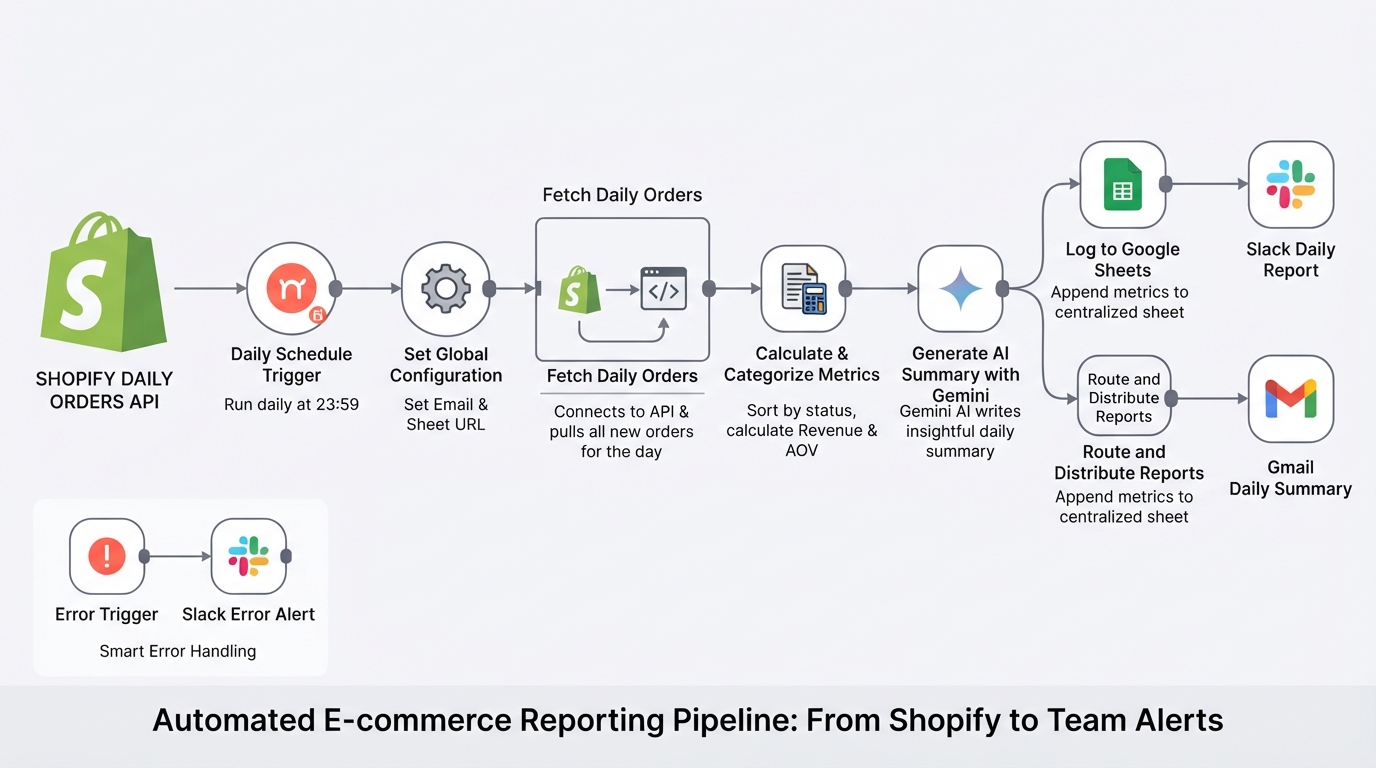
Summarize daily Shopify orders with Gemini, Google Sheets, Gmail and Slack
E-commerce store management made easy. The workflow pulls your daily Shopify orders, calculates metrics, logs them to Google Sheets, and uses Gemini AI to send a polished summary to your team via Slack and email.
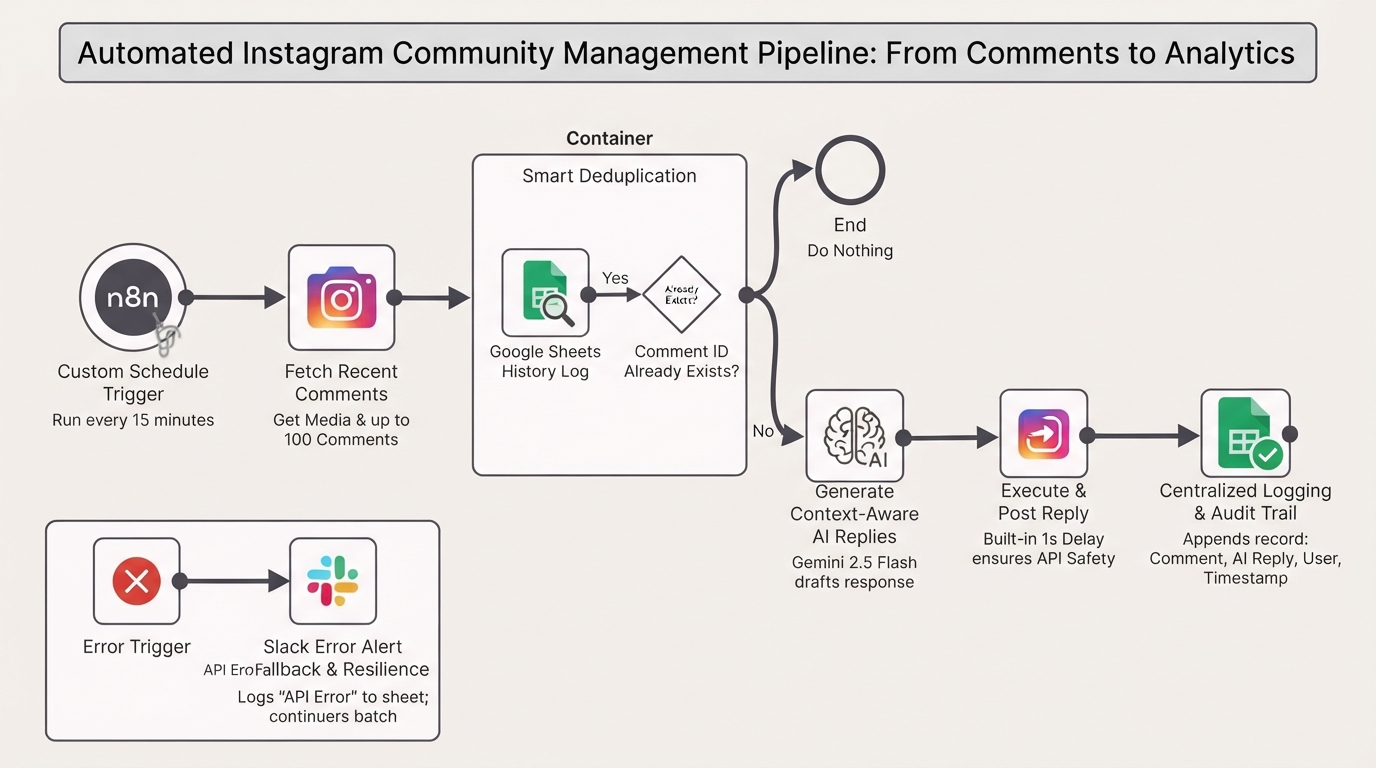
Auto-reply to Instagram comments with Gemini and Google Sheets tracking
Automate your Instagram community management authentically. This n8n workflow monitors your posts, uses Gemini AI to generate context-aware replies, and logs interactions in Google Sheets.
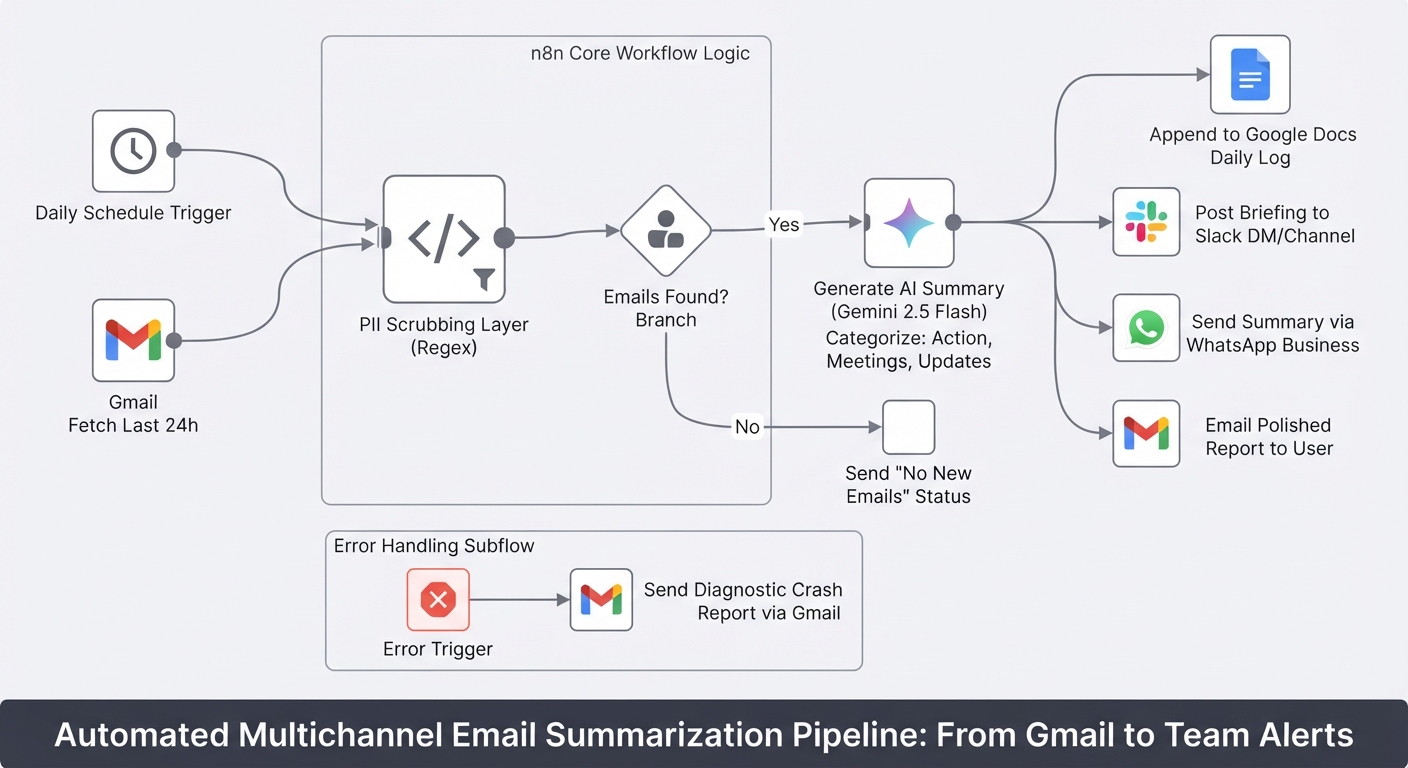
Summarize daily Gmail emails with Gemini and send to Slack, WhatsApp and Docs
Stop starting your day by drowning in unread emails. This workflow turns your Gmail inbox into a prioritized briefing delivered to Slack, WhatsApp, and Google Docs.

Shopify Dead Inventory Detection: Automated Workflow to Recover Lost Revenue
Detect unsold Shopify inventory automatically. Monitor dead stock, send CSV reports via Gmail and Slack alerts. Free n8n workflow template included.