
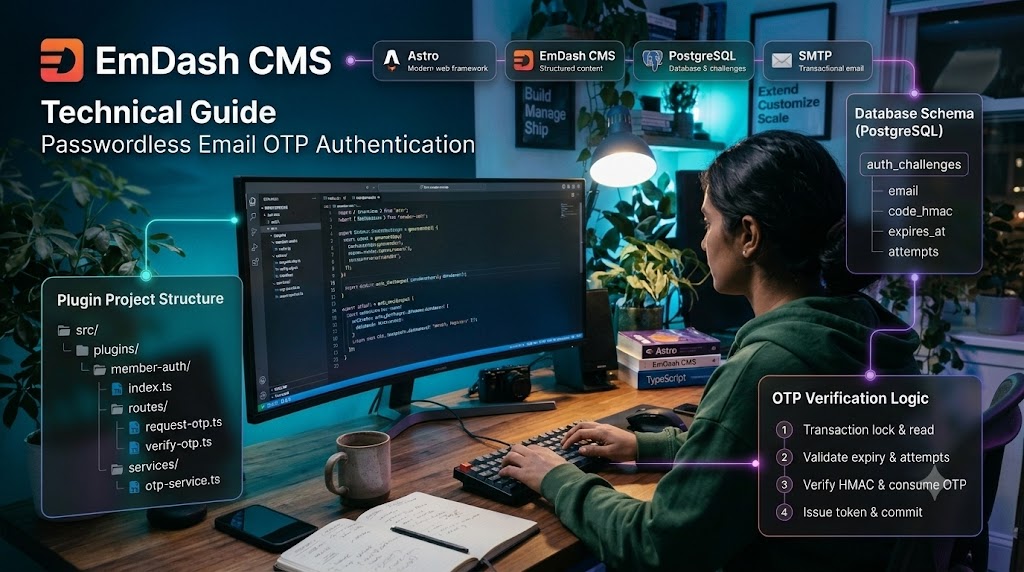
Passwordless Email OTP Authentication in EmDash CMS — Complete Technical Guide
Email OTP authentication lets users register or sign in using a one-time code sent to their email address, without storing a password. For a custom EmDash implementation, keep authentication logic in a dedicated native plugin rather than mixing it with the CMS admin authentication system.
Passwordless Email OTP Authentication in EmDash CMS — Complete Technical Guide
1. Architecture
Email OTP authentication lets users register or sign in using a one-time code sent to their email address, without storing a password.
For a custom EmDash implementation, keep authentication logic in a dedicated native plugin rather than mixing it with the CMS admin authentication system.
Technology stack
- EmDash CMS with Astro
- TypeScript and Node.js crypto APIs
- PostgreSQL for authentication challenges and rate-limit state
- SMTP for transactional email
- JWT for short-lived authentication or registration tokens
- A separate member content type for profile data
Authentication flow
User enters email
       |
       v
Check account / request OTP
       |
       v
Generate OTP and store HMAC
       |
       v
Send OTP through SMTP
       |
       v
User submits OTP
       |
       v
Verify expiry, attempts and HMAC
       |
       +---- Existing account --> Issue login token
       |
       +---- New account ------> Issue registration token
                                      |
                                      v
                              Complete registration
                                      |
                                      v
                                Create member
The authentication plugin should own the challenge lifecycle, token issuance, rate limiting, and account verification. EmDash content APIs should handle member records where appropriate.
2. Project structure
Keep public authentication APIs separate from any administration interface.
src/
├── plugins/
│   ├── member-auth/
│   │   ├── index.ts
│   │   ├── routes/
│   │   │   ├── check-email.ts
│   │   │   ├── request-otp.ts
│   │   │   ├── verify-otp.ts
│   │   │   ├── complete-registration.ts
│   │   │   └── logout.ts
│   │   ├── services/
│   │   │   ├── otp-service.ts
│   │   │   ├── token-service.ts
│   │   │   ├── email-service.ts
│   │   │   └── member-service.ts
│   │   ├── schemas/
│   │   │   └── auth-schemas.ts
│   │   └── types/
│   │       └── auth.ts
│   └── member-management/
│       ├── index.ts
│       └── admin.tsx
├── lib/
│   └── db.ts
└── pages/
    └── account/
        ├── login.astro
        └── register.astro
migrations/
└── 001_create_auth_challenges.sql
member-auth exposes the public authentication API. member-management is optional and can provide custom admin pages for managing members.
Register the native plugin in astro.config.mjs using the plugin descriptor and entry point required by the installed EmDash version. Native plugin routes are mounted under:
/_emdash/api/plugins/<plugin-id>/<route-name>Official references:
3. Define the authentication API
Use separate endpoints for account discovery, OTP delivery, OTP verification, and registration completion.
| Method | Endpoint | Responsibility |
|---|---|---|
| POST | /signup/check-email | Determine the appropriate signup path |
| POST | /signup/request-otp | Issue a registration OTP |
| POST | /signup/verify-otp | Verify OTP and issue a registration token |
| POST | /signup/complete | Validate token and create the member |
| POST | /login/request-otp | Send a login OTP |
| POST | /login/verify-otp | Verify OTP and issue a login session |
| POST | /logout | Invalidate the application session |
These are logical route names. Adapt their registration to the actual route API supported by the installed EmDash version.
Example request bodies
Request OTP
{
  "email": "[email protected]"
}
Verify OTP
{
  "email": "[email protected]",
  "challengeId": "opaque-challenge-id",
  "code": "123456"
}
Complete registration
{
  "registrationToken": "short-lived-token",
  "firstName": "Alex",
  "lastName": "Morgan",
  "phone": "+15551234567"
}
Validate every request using a runtime schema validator such as Zod. Never trust frontend validation alone.
4. Create the database schema
OTP challenges are temporary authentication state, not member profile data. Store them separately from the EmDash member content type.
The following PostgreSQL schema is an application-owned migration example.
migrations/001_create_auth_challenges.sql
CREATE TABLE auth_challenges (
    id UUID PRIMARY KEY,
    email TEXT NOT NULL,
    purpose TEXT NOT NULL
        CHECK (purpose IN ('login', 'signup')),
    code_hmac TEXT NOT NULL,
    expires_at TIMESTAMPTZ NOT NULL,
    attempts INTEGER NOT NULL DEFAULT 0,
    max_attempts INTEGER NOT NULL DEFAULT 5,
    consumed_at TIMESTAMPTZ,
    created_at TIMESTAMPTZ NOT NULL DEFAULT NOW()
);
CREATE INDEX idx_auth_challenges_email_purpose
    ON auth_challenges (email, purpose, created_at DESC);
CREATE INDEX idx_auth_challenges_expiry
    ON auth_challenges (expires_at);
Important design decisions:
- code_hmac stores a keyed digest, not the raw OTP.
- purpose prevents a login code from being used for registration.
- expires_at limits the challenge lifetime.
- attempts and max_attempts prevent unlimited guesses.
- consumed_at records successful use and prevents replay.
Apply this migration through your application's migration process. Do not assume that editing emdash-env.d.ts or changing a content schema creates arbitrary application tables.
If the implementation uses EmDash plugin storage instead of a separate SQL table, confirm that its operations support the atomicity and expiry guarantees required by the authentication design.
5. Configure environment variables
Keep credentials outside source control.
AUTH_JWT_SECRET=replace-with-a-long-random-secret
AUTH_OTP_HMAC_SECRET=replace-with-an-independent-random-secret
[email protected]
SMTP_FROM_NAME=Example Membership
SITE_URL=https://example.com
Generate independent secrets rather than reusing the same key for OTP digests and JWT signing.
For example, generate a secret using Node.js:
node -e "console.log(require('node:crypto').randomBytes(32).toString('hex'))"Store the resulting values in the server's secret-management mechanism. Restart or redeploy the application after changing environment variables.
6. Implement OTP generation and verification
Use a cryptographically secure random-number generator. The example below generates a six-digit code, including leading zeros.
src/plugins/member-auth/services/otp-service.ts
import {
  createHmac,
  randomInt,
  timingSafeEqual,
} from "node:crypto";

const OTP_TTL_MS = 5 * 60 * 1000;
const MAX_ATTEMPTS = 5;

function getHmacSecret(): string {
  const secret = process.env.AUTH_OTP_HMAC_SECRET;
  if (!secret) {
    throw new Error("OTP HMAC secret is not configured");
  }
  return secret;
}

export function generateOtp(): string {
  return randomInt(0, 1_000_000)
    .toString()
    .padStart(6, "0");
}

export function createOtpHmac(input: {
  challengeId: string;
  email: string;
  purpose: "login" | "signup";
  code: string;
}): string {
  const payload = [
    input.challengeId,
    input.email.trim().toLowerCase(),
    input.purpose,
    input.code,
  ].join(":");
  return createHmac("sha256", getHmacSecret())
    .update(payload)
    .digest("hex");
}

export function verifyOtpHmac(
  expectedHex: string,
  actualHex: string,
): boolean {
  const expected = Buffer.from(expectedHex, "hex");
  const actual = Buffer.from(actualHex, "hex");
  if (
    expected.length !== 32 ||
    actual.length !== 32
  ) {
    return false;
  }
  return timingSafeEqual(expected, actual);
}

export { OTP_TTL_MS, MAX_ATTEMPTS };
The HMAC binds the code to a specific challenge, normalized email, and authentication purpose. This prevents a digest from being reused across different challenges.
A six-digit OTP has a small search space. HMAC storage reduces accidental exposure, but it does not replace strict attempt limits, short expiry, or protection of the HMAC secret.
7. Implement the OTP request service
The route should orchestrate the following steps:
- Normalize and validate the email.
- Apply IP-based and email-based rate limits.
- Generate an opaque challenge ID.
- Generate the OTP and calculate its HMAC.
- Persist the challenge and expiry.
- Send the code using the configured SMTP transport.
- Return a generic response that does not reveal whether an account exists.
Service contract
type OtpPurpose = "login" | "signup";

interface CreateChallengeInput {
  email: string;
  purpose: OtpPurpose;
}

interface OtpChallenge {
  id: string;
  email: string;
  purpose: OtpPurpose;
  codeHmac: string;
  expiresAt: Date;
  attempts: number;
  maxAttempts: number;
  consumedAt: Date | null;
}
Use a repository or database adapter to implement persistence. The core OTP service should not depend on HTTP request objects or UI components.
Important implementation detail
Do not send an OTP before successfully recording its challenge. If email delivery fails, invalidate the challenge or mark it as undeliverable so the user is not left with an unusable code.
Also avoid logging OTP values, HMAC secrets, JWTs, or full authentication tokens.
8. Implement OTP verification atomically
OTP verification must not be a simple sequence of unrelated database reads and writes. Two concurrent requests must not be able to consume the same challenge successfully.
Use a database transaction and lock the challenge row before checking attempts or consuming the challenge.
Conceptually:
BEGIN;
SELECT *
FROM auth_challenges
WHERE id = $1
  AND email = $2
  AND purpose = $3
FOR UPDATE;
-- Application validates:
-- 1. Challenge exists.
-- 2. It has not expired.
-- 3. It is not consumed.
-- 4. Attempts are below the maximum.
-- 5. The submitted OTP matches the stored HMAC.
-- On invalid OTP:
UPDATE auth_challenges
SET attempts = attempts + 1
WHERE id = $1;
-- On valid OTP:
UPDATE auth_challenges
SET consumed_at = NOW()
WHERE id = $1
  AND consumed_at IS NULL;
COMMIT;
This is a transaction outline, not a complete executable query sequence. Implement the validation and update branches in your repository and roll back on unexpected errors.
A successful verification should consume the OTP before issuing the next-stage token. Enforce a single-use guarantee even if the user submits the same code concurrently.
9. Send the OTP through SMTP
Keep email delivery in a dedicated service.
src/plugins/member-auth/services/email-service.ts
export interface EmailTransport {
  sendMail(input: {
    from: string;
    to: string;
    subject: string;
    text: string;
    html?: string;
  }): Promise<unknown>;
}

export async function sendOtpEmail(
  transport: EmailTransport,
  email: string,
  code: string,
): Promise<void> {
  const from = process.env.SMTP_FROM;
  if (!from) {
    throw new Error("SMTP sender is not configured");
  }
  await transport.sendMail({
    from,
    to: email,
    subject: "Your sign-in verification code",
    text: [
      `Your verification code is ${code}.`,
      "It expires in five minutes.",
      "If you did not request this code, ignore this email.",
    ].join("\n"),
  });
}
Pass a transport configured by your SMTP provider or the email integration available in your EmDash environment. This interface deliberately keeps provider-specific SMTP configuration separate from authentication logic.
For production delivery, configure TLS, sender-domain authentication (SPF, DKIM, and DMARC), delivery-error handling, and monitoring.
10. Issue short-lived tokens
Use different token purposes for login and registration.
A registration token should authorize only the registration-completion operation. It must not be accepted as a normal login session.
Example claims:
interface RegistrationTokenClaims {
  sub: string;       // Verified email or internal identity
  purpose: "registration";
  challengeId: string;
  jti: string;       // Unique token identifier
  iat: number;
  exp: number;
}
For login tokens, use a distinct purpose or token type and include the internal member ID as the subject.
Implementation requirements:
- Use a maintained JWT library.
- Explicitly restrict accepted signing algorithms.
- Validate signature, issuer, audience, expiry, and purpose.
- Keep registration tokens short-lived.
- Never accept a user ID supplied by the browser as proof of identity.
- If tokens can be replayed, keep a server-side record of their use or use a server-side session.
- Store browser sessions in HttpOnly, Secure, appropriately configured SameSite cookies.
A JWT signature alone does not make a token single-use or immediately revocable.
11. Complete registration and connect the member record
The registration-completion endpoint should:
- Verify the registration token.
- Confirm its purpose and expiry.
- Confirm the email was verified.
- Validate the profile fields.
- Check for an existing account using a database-enforced uniqueness rule.
- Create the member record.
- Return a safe profile representation or establish the session.
Use the actual field names from your EmDash content schema. For example:
interface MemberRegistrationInput {
  email: string;
  first_name: string;
  last_name: string;
  phone: string;
}
Do not assume a field called zip_code exists if the collection uses zipcode. Match your generated EmDash types and the current collection definition.
The member-creation operation should be idempotent or protected by a unique constraint so retries cannot create duplicate accounts. If member creation and token consumption involve different storage systems, define an explicit recovery strategy for partial failures.
12. Design frontend states
Keep login and signup as explicit state transitions rather than one large form.
EMAIL_ENTRY
    |
    v
OTP_REQUESTED
    |
    v
OTP_VERIFICATION
    |
    +---- Login success ----> MEMBER_PORTAL
    |
    +---- Signup success ---> REGISTRATION_FORM
                                  |
                                  v
                            MEMBER_CREATED
The frontend should handle:
- Loading and request-in-progress states
- Invalid or expired OTP messages
- Resend cooldowns
- Maximum-attempt responses
- Email delivery failures
- Registration validation errors
- Expired registration tokens
Do not rely on a disabled button for rate limiting. Enforce limits on the server.
13. Security checklist
Before production deployment, verify these controls:
- OTPs are generated using a cryptographically secure random generator.
- OTPs expire quickly and can be used only once.
- OTP values are never persisted in plaintext or written to logs.
- HMAC and JWT secrets are separate and stored securely.
- Verification attempts and OTP requests are rate-limited by email and IP.
- Resending invalidates the previous challenge.
- Responses avoid revealing whether an email is registered.
- Verification and consumption are atomic.
- Registration tokens cannot be used as login tokens.
- Member creation has a database-enforced uniqueness strategy.
- Cookie-based sessions have appropriate security attributes and CSRF protection.
- Unexpected errors do not expose secrets or stack traces.
- Expired challenges are periodically cleaned up.
- SMTP delivery failures and rate-limit events are monitored.
See the OWASP Multifactor Authentication Cheat Sheet for guidance on OTP lifetime, single-use behavior, attempt limits, and secret handling.
14. Test the complete flow
Test each route independently before testing the full user journey.
| Test | Expected result |
|---|---|
| Request OTP with valid email | Challenge created and email sent |
| Submit incorrect OTP | Verification rejected; attempt count increases |
| Submit expired OTP | Verification rejected |
| Submit the same OTP twice | Only the first valid verification succeeds |
| Exceed attempt limit | Challenge blocked |
| Resend OTP | Previous challenge invalidated |
| Complete registration with expired token | Registration rejected |
| Register an existing email | Duplicate account prevented |
| SMTP delivery fails | No usable, untracked challenge remains |
| Submit concurrent verification requests | Challenge consumed at most once |
| Call a protected member endpoint without a valid session | Request rejected |
For a native EmDash plugin, test public route registration and response behavior against the installed EmDash version. EmDash plugin routes are documented at API Routes.
Conclusion
A maintainable EmDash email OTP implementation separates the authentication API, OTP service, token service, email transport, database repository, and member content operations. The essential production guarantees are short OTP lifetimes, atomic single-use verification, strict rate limiting, purpose-specific tokens, and safe member creation.
Related Posts

EmDash CMS Technical Guide — Project Setup, Schemas, Database, and Migrations
EmDash is an open-source, Astro-based content management system that provides structured content, an administrative interface, database integration, and plugin extensibility. This guide walks through creating an EmDash project, understanding its directory structure, configuring content schemas, generating TypeScript definitions, querying content, and managing database changes.

Creating a Native EmDash Plugin — Complete Technical Guide
EmDash plugins allow developers to extend the CMS with custom API routes, content lifecycle hooks, storage, settings, and administrative interfaces. In this tutorial, we'll create a native plugin named plugin-activity that records content-save events, exposes an API endpoint, and adds a React page to the EmDash admin panel.

WordPress vs. Cloudflare EmDash CMS
WordPress offers an established ecosystem. EmDash brings an Astro-based approach to content management. Compare the practical trade-offs before choosing your next CMS.
Wordpress Speed optimization
Page Speed: Why It's Important!