
Difference between various hosting types
Every website runs on a server, and web hosting gives you the server space and resources needed to make your site accessible online. Learn how web hosting works and why it's essential for building and maintaining a website.
What Is Web Hosting?
Every website you've ever visited is hosted on a server. Generally speaking, servers are just computers configured from the ground up to display content online and handle web traffic.
When you sign up for web hosting services, you are essentially renting server space - or even the entire computer in some cases. It is possible to build and maintain a public website using that space and a limited amount of resources.
There is nothing complicated about the concept on paper. The features and functionality of hosting plans vary greatly. Using a web server with only 512 MB of RAM or a single-core processor would be as painful as working on a computer with similar specs.
In line with the growth of your website, so do its requirements. That's why you can find a variety of hosting plans ranging from inexpensive to bespoke when you search for hosting.
The best type of plan for you will be one that fits both your budget and your specific needs. Unless your website receives massive amounts of traffic every day, choosing the most expensive hosting plan can be a waste of money.Unless your website receives massive amounts of traffic every day, choosing the most expensive hosting plan can be a waste of money.
Choosing a web host can be intimidating if you've never used one before. We'll explore each type of hosting plan in detail over the next few sections. In addition to discussing which hosting solution is right for your site, we'll also discuss how much you should expect to pay.
7 Different Types of Web Hosting (Plus Their Pros and Cons)
In addition to costs and hardware, there are many differences between hosting plans. There are some instances when entire hosting services are built around specific platforms, for instance, such as WordPress. Let's take a look at the seven most common types of web hosting, so you can make an informed decision.
1. Shared Hosting
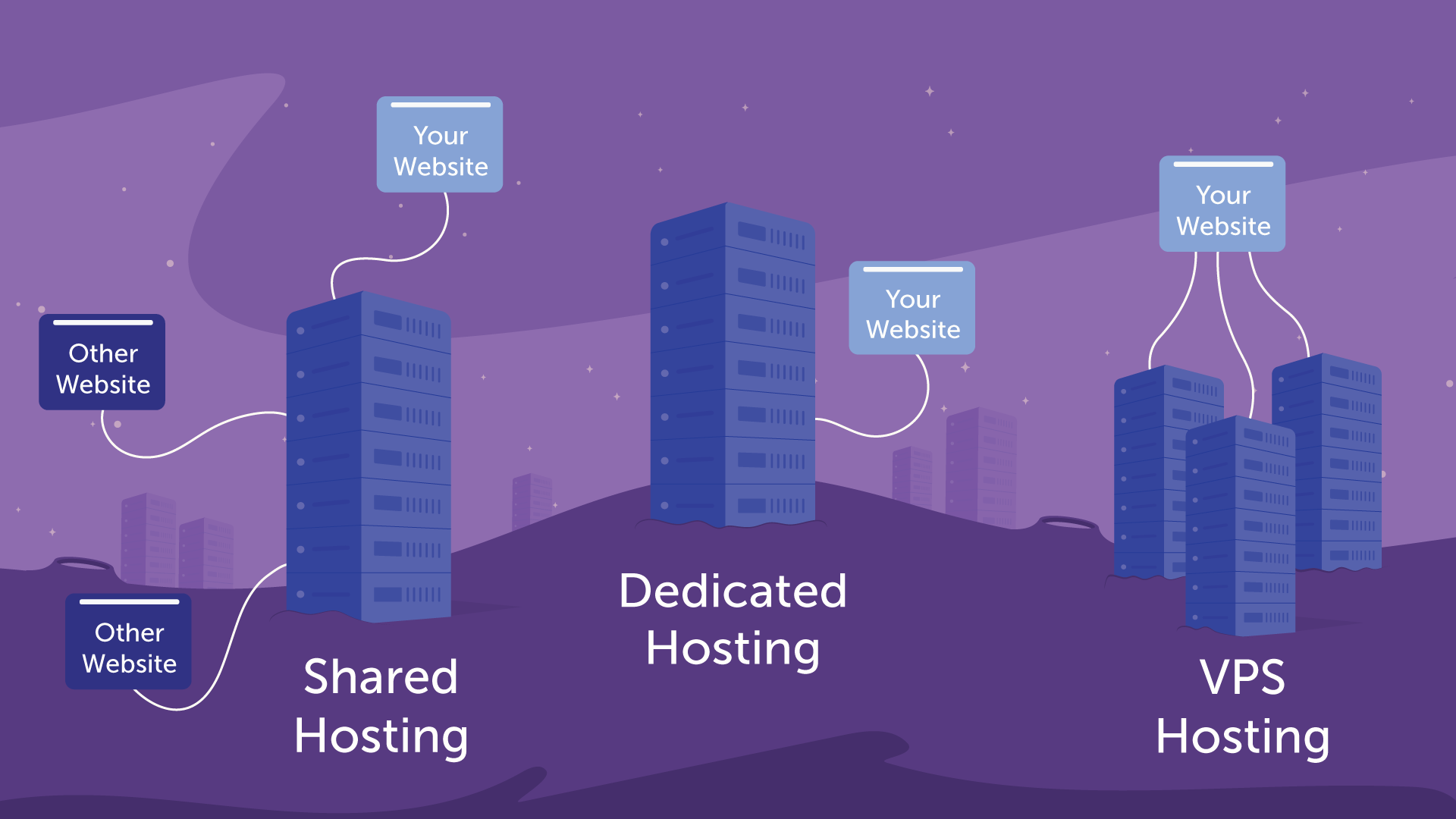
The most popular hosting plan for website owners is shared hosting. It involves sharing a server among multiple users. The result is that a single computer (a shared server) is capable of hosting a large number of websites (or even hundreds of them).
You do not have access to other users' files, private information, or any other data, even though you share resources with them. As a result of hosting providers sharing server maintenance costs between multiple customers, shared plans tend to be cheap.
Although shared hosting does not always have the best reputation, the quality of the service you receive depends greatly on your hosting provider. There are some shared hosting plans that are very limited, but there are others that can handle websites that get decent traffic.
In the market for starter web hosting, shared plans are probably the best choice. The cost of this type of hosting is much lower than other types.
You should be aware that a lot of web hosts attempt to lock you into long-term contracts to get the best rates. It can be intimidating if this is your first time signing up for a web hosting plan, but isn't necessarily a bad thing if you're sure about the host you're using.
List of famous Wordpress shared hosting providers
#1 HostGator: More control with HostGator
#2 TMDHosting: The best drag-and-drop editor and hosting service
#3 Bluehost: Ideal for smaller sites
#4 InMotion: Perfect for professional emails
#5 DreamHost: The best host for building a new website
#6 IONOS: The best option for startups
#7 MochaHost: Automatic backups are the best
#8 InterServer: The most secure
#9 GoDaddy Hosting: The best for e-commerce
#10 Hostwinds: Offers unlimited storage for the best price
Pros of shared hosting:
On small and medium-sized sites, you can expect excellent performance from your service provider.
- It's cheaper
- The system is flexible
- Self-management is simple
- Multiple domains can be hosted
- The company is professionally run
- Dynamic websites can be hosted on it
Cons of shared hosting:
Websites with high traffic are often not well served by shared plans.
Multi-year contracts are often necessary for the best rates.
Is Shared Hosting Right for Me?
Your site should be hosted on shared hosting if:
Having little experience with web hosting
Keep costs low
Do you plan to design a website for your small business or for a friend or family member?
Do not require extensive web programming skills
Studying Joomla and WordPress applications
Start-ups or small businesses
Experiment with web design and coding
Having never created a website before, there's a lot you don't know, but you can count on some things. Unless you plan on launching a massive marketing campaign, you won't attract masses of traffic when your site is newly launched. A new site is unlikely to require much bandwidth in this case. Furthermore, you can't predict how much space you'll need unless you know exactly what size your content and images will be. There is a flexible solution to these unknowns in shared hosting.
2. Virtual Private Server (VPS) Hosting
When it comes to performance and customizability, virtual private servers (VPSs) are a step above-shared plans. A VPS is a virtual server that consists of multiple virtual partitions on one physical server. Containers, or virtual private servers, function as full systems devoted solely to your site. This means you get dedicated resources and, in some cases, access to the configuration of that server.
Though you still share a physical server, VPSs provide a higher level of isolation between users. The performance and security of this system can, however, be enhanced. You might also be able to configure your VPS from scratch, depending on your hosting provider.
You should be able to run a simple WordPress website on a single-core VPS with 1GB of RAM. If you're new to web hosting, figuring out how much power each project requires might make a VPS less attractive.
With VPSs, you may not get access to a control panel out of the box. Therefore, you may need to use the command line to configure your server and set up your website. This can be a complicated process if you don't have experience with the command line.
As VPSs differ greatly in terms of resources, prices can vary widely. In the same vein as shared hosting, it is not uncommon to find VPSs starting at lower prices than shared hosting. This type of hosting requires a higher budget.

List of famous Wordpress VPS hosting providers
#1 IONOS: Overall Best
#2 GoDaddy: The most affordable
#3 DreamHost: No-cost email service
#4 Hostinger: Most Transparent
#5 Hostwinds: Among the best
#6 MochaHost: Guaranteed money back
#7 Interserver: The best platform for scaling businesses
#8 HostGator: The best resource provider
#9 Bluehost: The best hosting for beginners
Pros of VPSs:
Your website gets fully dedicated resources.
You may be able to configure your VPS according to your specific needs depending on your host.
Reliability has been improved. Stacks of dominos are similar to shared hosting. ...
A dedicated team of resources. ...
A green platform that increases efficiency. ...
Enhanced performance. ...
Instantly scale resources. ...
Full-service management. ...
Grow your business while saving money.
Cons of VPSs:
It can be difficult to determine how many resources you will need.
VPS configuration often requires some technical expertise.
Is VPS Hosting Right for Me?
By now, you may already have an idea whether or not you want to try VPS hosting. Nevertheless, let's make the decision as clear as possible in case you're still on the fence.
Consider upgrading to VPS hosting if any of the following apply to you:
Your web hosting can be a little more expensive each month if you want to.
There are too many resources being used by your site for a basic shared hosting plan.
There is an increase in traffic (or you expect one in the near future).
It is necessary to be able to scale your hosting up and down according to your traffic levels.
If you want to make changes to the way your hosting server is configured, or if you just want to learn how to manage it yourself, you have come to the right place.
Having decided to try VPS hosting, what's next?
You should check with your current hosting provider to see if they offer VPS plans. Switching providers is more difficult than upgrading. We'll be happy to assist you if you contact your host's support team.
Alternatively, if that's not an option, look for a provider with a solid reputation, a good understanding of WordPress, and plenty of scalabilities.
Check out our guide to choosing a quality web host for more information. In addition, we have reviewed a number of specific hosting providers, many of which offer VPS plans. Choosing a web host is just as important as choosing a plan - so do your research and read up on all the options before making a decision.
3. Cloud Hosting
It gets a little trickier when it comes to cloud hosting. People usually refer to distributed VPSs as the "cloud." Distributed VPSs involve hosting a virtual server on a whole network, rather than on one computer.
This network of computers is called the “cloud.” The advantage of this approach is that you can easily scale the server's resources as needed. Due to the system's built-in redundancy, downtime and data loss are rarely issues with cloud hosting.
Cloud hosting may sound great on paper, but it is not always user-friendly for newbies. The cost of cloud hosting is often charged per hour, for instance. It all begins with spinning up an instance, which is essentially a virtual private server, configuring it according to your needs, and accumulating charges.
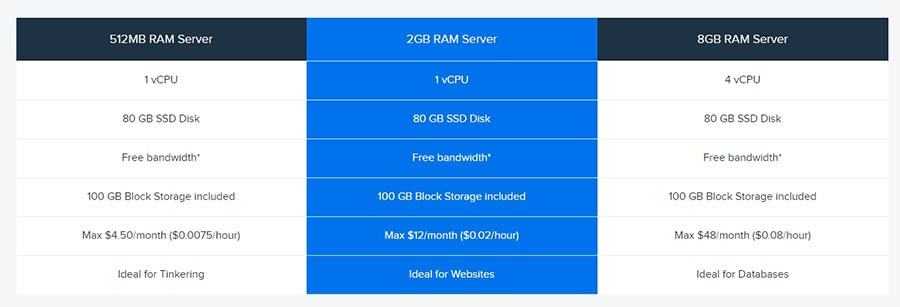
Depending on your server configuration, cloud hosting can be incredibly cheap or extremely expensive. Many massive internet-based companies, like Netflix, use this type of setup to power their operations. You probably don't need anything like Netflix's setup for a regular website.
List of famous Wordpress Cloud hosting providers
Pros of cloud hosting:
One of its strongest features is its scalability.
The server can be customized to suit your needs.
The cloud promotes business continuity.
You will see an increase in the speed of your data delivery.
Make sure your critical services are accessible from anywhere.
In terms of security, you are not the only one responsible.
It is possible to improve the performance of your website by using cloud hosting.
Cons of cloud hosting:
The payment structures for cloud hosting can be a bit complicated.
It’s not well suited for users who don’t have experience with configuring a server.
Is cloud hosting right for me?
It is usually the case that cloud hosting is sold on a sliding scale, so you will end up paying according to how many server resources you actually use. Cloud hosting might be the best option for you if you'd like to experiment with different hosting environments and have something more flexible to support you.
4. Dedicated Hosting
The only hosting plans we've discussed so far are those in which you share servers with other people. There is a premium associated with private servers, and you will need to pay for one if you want it all to yourself.
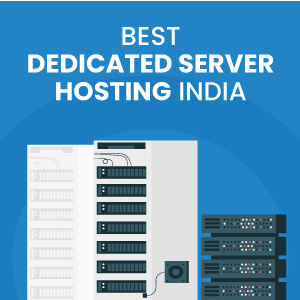
Dedicated servers are servers that you get exclusive access to (or sometimes more than one). The web hosting company will merely house it for you, and you'll have full control over its configuration.
When it comes to web hosting, dedicated servers are the best option.
A dedicated server would be overkill if you're launching a new website as a hobby. Businesses and established websites that need powerful hardware should only consider this kind of hosting solution.
Pros of dedicated hosting:
A whole server is yours to use.
It is usually possible to configure your server according to your preferences.
DreamHost users get unlimited bandwidth
Cons of dedicated hosting:
The cost of this option is high.
Is dedicated hosting right for me?
Consider the factors listed in this web hosting checklist when choosing a hosting provider. There are numerous reasons why you may want to consider Dedicated Server hosting. If your field requires resource-intensive software, you may be in the right place. It is possible that your company has outgrown other forms of hosting, such as shared or virtual private servers.
There may even be a feeling that your site will require a lot of resources, whether it is disk space, bandwidth, or RAM. It may be necessary for you to purchase a Dedicated Server, but there are other factors to consider before purchasing a Dedicated Server.
5. Managed Hosting
There is a difference between managed hosting and shared hosting. It isn't a type of plan, but a type of service. With managed hosting, you don't have to worry about day-to-day maintenance tasks as your provider handles them for you. Backing up, monitoring security, updating software, etc., are some of the tasks you need to perform.
It's important to understand that managed hosting plans are available
in a variety of flavors. Managed shared plans, managed VPSs, and even
managed dedicated servers are available. You pay a little more in all
of these cases so you don't have to worry about the nuts and bolts
You don't have to worry about the nuts and bolts of hosting, so you
can focus on growing your blog, portfolio, or e-commerce website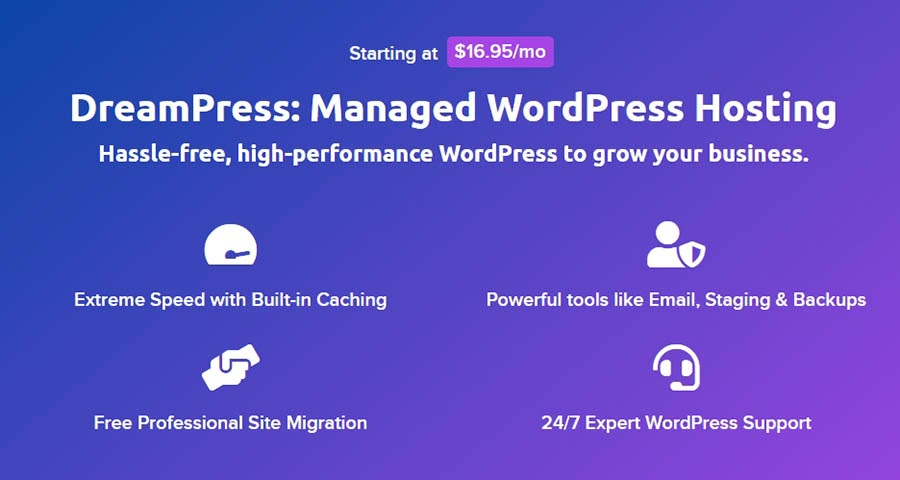
It varies greatly from one provider to another what passes for managed hosting. Almost every aspect of running your site can be supported by some hosting companies around the clock. Maintenance will be handled by others.
Consequently, it's important to look into your provider's "extras" before signing up for a managed hosting plan.
List of famous Wordpress Managed hosting providers
#1 Bluehost
#2 SiteGround
#3 WP Engine
#4 Hostinger
#5 DreamPress
#6 HostGator
Pros of managed hosting:
Basic maintenance tasks will be handled by your provider.
You might be able to optimize your website performance with the help of your web host.
WordPress experts are available to help.
Here are the best security practices for WordPress.
Performance improvements and faster sites.
Local environments and staging sites can be created in one click.
Server setups that go beyond the basics.
SSL certificates can be added easily.
Hosting that can be resold.
Management of the site is easy.
Cons of managed hosting:
Compared to regular hosting plans, it tends to be more expensive.
The configuration of your server and the optimization of your site is less under your direct control.
Is managed hosting right for me?
For WordPress-specific services, powerful tools, and dedicated resources. Because of those services, tools, and resources, it's recommended not just for enterprise-level companies' WordPress sites with high traffic, but for any business, e-commerce, established, traffic-generating website (including popular blogs), or mid- to large-sized agency's WordPress-based website that would benefit from the optimized stability, performance, and user experience. It is, however, slightly more expensive, so you'll have to consider that when making your decision.
6. WordPress Hosting
Understanding how popular WordPress is is crucial to understanding the concept of WordPress hosting. More than 30% of the web runs on WordPress as a platform. A large number of websites, from giant businesses to hobbyist blogs, use WordPress, including the DreamHost blog.
Thus, it shouldn't be a surprise that many web hosting providers offer WordPress-specific plans. Managed services are usually included in WordPress-specific plans. Plugins, themes, and other tools are often included with free licenses.
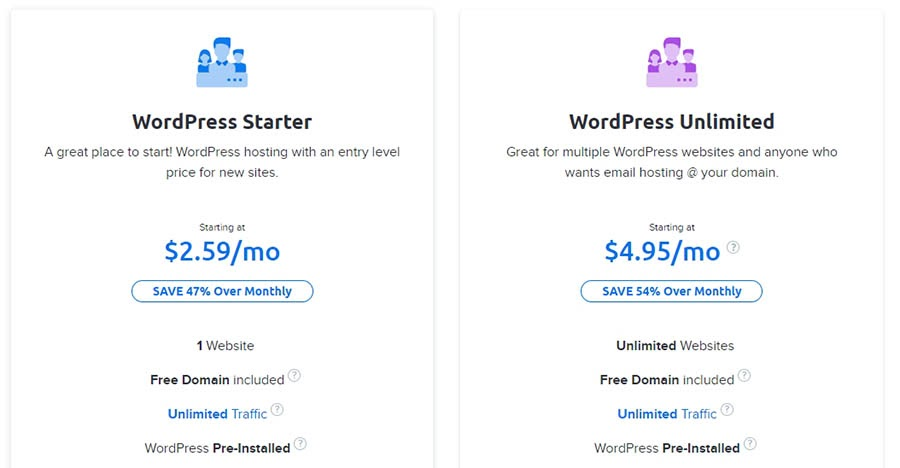
If you want to use WordPress to create a website, you don't have to use a WordPress-specific plan. If you want to use WordPress to create a website, you don't have to use a WordPress-specific plan. However, these types of plans are usually optimized to provide better performance and simplify your life. Using this type of hosting can be a smart choice if you plan on using WordPress.
In addition to WordPress-specific plans, there are entire hosting platforms that only support this CMS. Their support team usually includes WordPress experts, which can be a nice perk. Best of all, WordPress-specific plans are typically priced about the same as their more generic counterparts.
Pros of WordPress hosting:
Managed services are often included.
In addition to free plugin licenses and one-click installations, you receive WordPress-specific perks.
Money-back guarantee and 99.9% uptime guarantee.
Up to 50% faster load times with CDN Boost.
Free professional email for the first year
Security and core software updates are automatically performed on WordPress.
Thousands of free themes and plugins are available.
An easy-to-use migration tool.
Start-up support and pre-built sites for beginners.
PHP's latest version.
Domain name that is temporary.
24/7 support is free.
It supports WP-CLI, SSH, and SFTP (for Deluxe, Ultimate, and E-commerce).
Developer access and staging site.
Cons of WordPress hosting:
You can't use other platforms with it since it's only useful for WordPress users.
Is WordPress hosting right for me?
The answer ultimately depends on your comfort level with website management. We make WordPress easy to manage even if you've installed WordPress before and know how to keep it updated regularly. Our team will handle all the heavy lifting, so you don't have to. WordPress Hosting makes your life easier when it comes down to it.
7. Reseller Hosting
Hosting is probably an essential part of running a business that builds websites, such as a design or development agency. Many clients don't quite understand how hosting works and could use some help setting everything up.
There is a solution for those types of situations in reseller hosting. A hosting account gives you access to hosting services for your clients. You are responsible for managing the accounts of those clients, who pay you directly.
You're 100% right if you think that sounds like extra work. However, reseller hosting does offer a lot of benefits if you know how to use it. You can charge whatever you like for hosting with most web hosts that offer reseller accounts. Hosting can be transformed into a recurring revenue source for web development agencies.
Controlling a client's hosting allows you to take care of their website's maintenance, ensuring everything is running smoothly. Reselling hosting is not for our regular users or individual projects. Consider another option on this list if all you're looking for is a way to create a website of your own.
Pros of reseller hosting:
It is possible to set up hosting accounts for third parties and charge them directly.
Your hosting experience is completely in your hands.
Reseller accounts are easy to manage. ...
The ability to white label. ...
Make Your Own Hosting Packages. ...
Management of cPanel.
The entry barrier is low.
Client websites are easily accessible.
A scalable solution.
Cons of reseller hosting:
Billing clients usually falls to you, which comes with a lot of responsibility.
Maintaining and supporting your computer is usually your responsibility.
Is reseller hosting right for me?
Managing reseller hosting is a profitable business venture, and the reason is quite simple - you don't need a lot of capital. It doesn't require a lot of capital upfront. There is no need to hire expensive maintenance staff. Hardware uptime is also not your responsibility.
Which Type of Hosting Is Best for My Website?
It is difficult to make a broad recommendation about hosting services. Each web project has its own unique requirements, no matter how cliche it may sound. However, depending on what you need from your hosting provider, we can point you in the right direction:
Shared hosting is an excellent option if you want to get your website online for the least amount of money.
You might want to consider VPS hosting if you need a bit more power or customizability than shared hosting can provide.
If you know you will need help with basic website maintenance, choose managed hosting.
The process of assessing your needs becomes much easier once you've had some hosting experience under your belt. Cloud hosting and dedicated servers are probably best known to you if you need them for your website.
The process of signing up for your first web hosting plan is entirely different, however. It's generally not a good idea to sign a multi-year hosting contract right away. When you're not sure you want to stick with that provider, and you have a better idea of the quality of their service, it may be better to pay a little extra for month-to-month hosting.
In conclusion, remember that you can always upgrade your hosting plan in the future if you need to. You'll eventually graduate from shared hosting and move on to a more robust plan that offers you the power and features you need to grow your business online.
Hosting Services, Simplified
In terms of plans and features, the best web hosting services will offer plenty of choices. That way, when it comes to getting resources for growing your website, you are flexible.
What are the best options for you when it comes to web hosting? In the beginning, shared hosting is usually a safe bet, and you can always upgrade from there. A VPS, however, is a better choice if you are an experienced user who needs full configuration control.
Is it time for you to start building your first website? We offer very affordable shared hosting plans that include all the features you need to build your dream website!
Related Posts

How To Migrate A WordPress Site
Migrating a WordPress website may become necessary if your current hosting provider no longer meets your needs. With the right approach, you can transfer your site safely and efficiently while minimizing downtime and preserving your data.

How to Customize WordPress Plugins
WordPress plugins make it easy to add powerful features to your website, but their default functionality may not always fit your specific needs. By customizing plugins, you can extend their capabilities and tailor them to your requirements without building everything from scratch.

How To Use Ajax in WordPress
Ajax makes WordPress websites more interactive by enabling real-time updates without reloading the page. With the help of Ajax-powered plugins, you can easily add dynamic features that improve user engagement and create a smoother browsing experience.
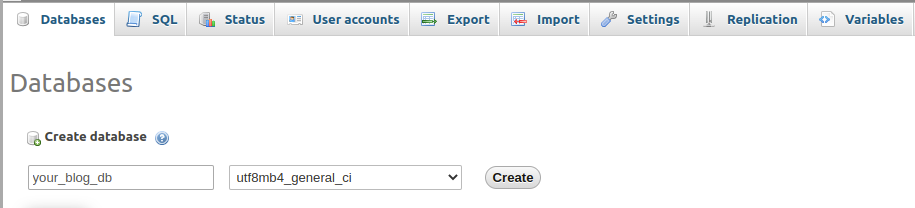
Setup & Install
Installing WordPress is a quick and straightforward process that usually takes just a few minutes. Follow these simple steps to set up WordPress on your website and get started with building your site.